
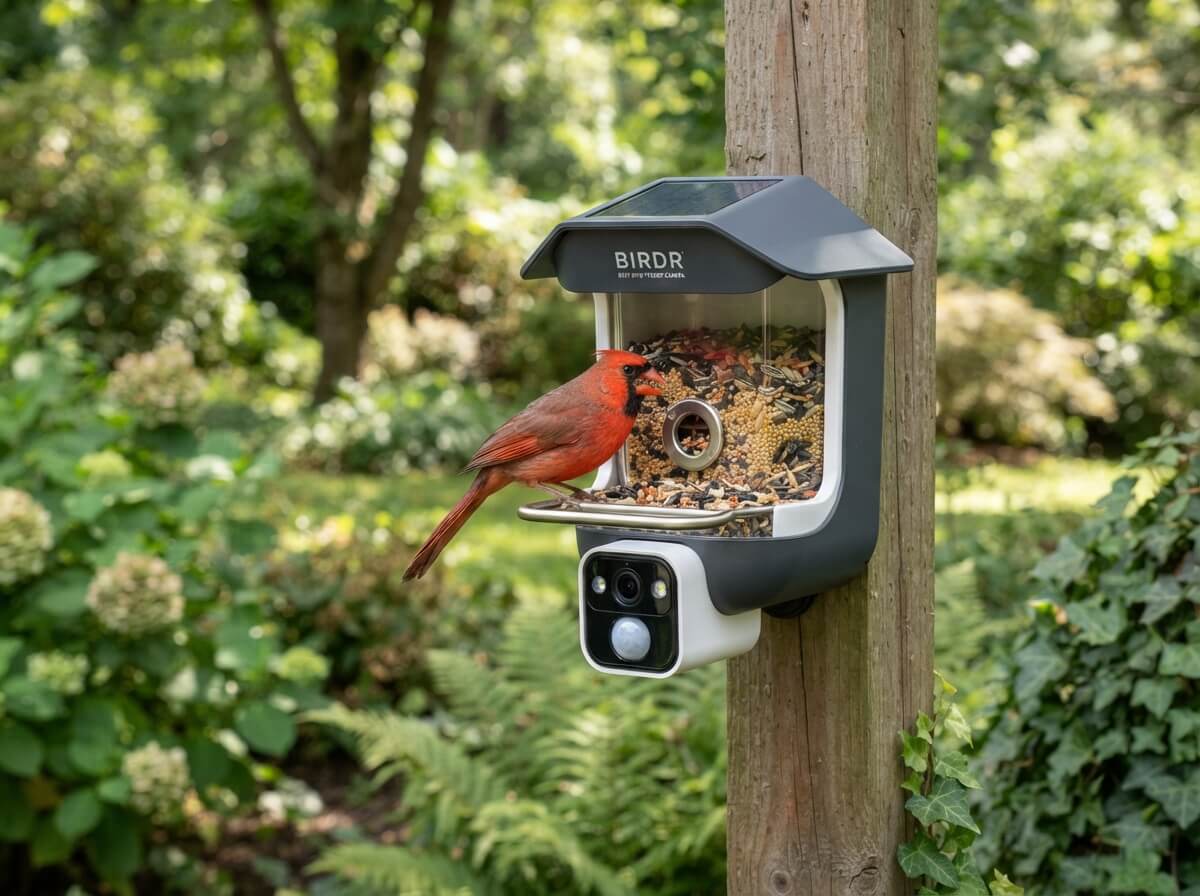
5 Best Bird Feeder Camera In 2026
A bird feeder camera turns a simple backyard hobby into something you can enjoy from your phone. You hang it up, fill it with seed, and wait for your first alert. A cardinal lands, your phone buzzes, and you get a clear look at the bird without scaring it away.
These feeders have grown fast in popularity because they remove most of the hard parts of birdwatching. You do not need a long lens or a lot of patience. You do not even need to sit near the window.
This roundup looks at five popular smart feeders with built-in cameras. All of them use solar power, record in high resolution, and promise AI bird identification. They look alike on paper, so the small differences matter a lot.
This is not a hands-on lab test. The reviews below are based on the listed features, how this type of product works in real backyards, and the common experiences buyers report with smart feeders. Where a detail is not clear from the listing, the review says so. That keeps the advice honest and useful.
By the end, you will know which feeder suits your yard, your budget, and your patience level.
Quick Look: The Best Bird Feeder Camera Options at a Glance
| Product | Video Quality | Standout Feature | Best For |
|---|---|---|---|
| HARYMOR Smart Bird Feeder (Green) | 2K HD | 2L seed capacity | Busy yards and low-refill routines |
| Smart Bird Feeder, Red | 2K HD | Gift-ready look | First-time bird lovers and gifting |
| Kiwibit Solar Smart Feeder | 4K HDR | Sharp live video | Detail lovers who watch live |
| Kiwibit Feeder with 8MP Photos | 4K | 8MP still photos | Bird photo collectors |
| Smart Bird Feeder, 2K Live Stream | 2K | Simple live streaming | Budget-minded beginners |
What Is a Bird Feeder Camera, and Why Do People Love It?
A bird feeder camera is a regular bird feeder with a small camera built in. The camera points at the perch or the seed tray. When a bird lands, the camera records a clip or a photo and sends it to your phone through Wi-Fi.
Most modern versions add AI bird identification. The app looks at the image and suggests a species name. So instead of guessing whether that little brown bird is a sparrow or a wren, you get a likely answer in seconds.
Solar power is the other big feature. A small solar panel on top charges the internal battery during the day. That means you do not need to run wires or swap batteries often.
People love these feeders for a few simple reasons:
- You can watch wild birds up close without disturbing them.
- Kids and older adults can enjoy nature from inside the house.
- The AI ID helps beginners learn species fast.
- You can share clips and photos with friends and family.
- It makes a thoughtful gift for anyone who likes gardens or wildlife.
How These Smart Bird Feeders Generally Work
Before the reviews, it helps to know the basic flow. Nearly every product in this roundup follows the same steps.
- You fill the feeder with seed and hang it in a safe spot.
- The camera wakes up when it senses motion near the perch.
- It records video or snaps a photo.
- The footage uploads to an app on your phone over Wi-Fi.
- The AI suggests a bird name and sends you an arrival alert.
The Wi-Fi link is the weak point for most buyers. If the feeder hangs far from your router, the signal can drop. A weak signal causes slow alerts, choppy live video, or missed clips. Keep that in mind as you read, because it affects every model here.
1. HARYMOR Smart Bird Feeder with Camera (Green)
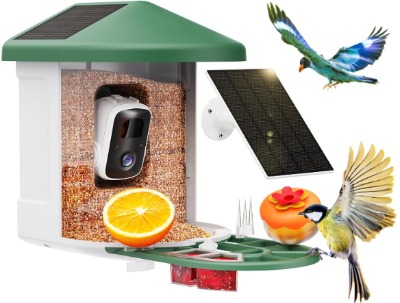
Product Description
The HARYMOR feeder is a solar-powered smart bird house with a built-in camera. It offers 2K HD video, live streaming, AI species identification, and instant arrival alerts. The green finish blends into trees and gardens, which helps it look natural and less startling to birds.
The standout detail is the 2L seed capacity. That is a large hopper for a camera feeder. A bigger hopper means you refill less often, and that matters more than most people expect.
Best Use Cases
This feeder fits people who want a “set it and forget it” setup. It works well in a backyard with steady bird traffic, like a yard with trees, shrubs, or a nearby water source.
It also suits anyone who travels often or has a busy week. Since the seed tank is big, a few days away will not leave the feeder empty. Of course, you should still check it often to keep the seed fresh.
Key Features Explained Simply
- 2K HD video: The picture is sharper than basic 1080p, so feather detail shows up better. You can see markings, eye color, and beak shape more clearly.
- AI bird identification: The app guesses the species for you. It gets most common birds right, though rare or blurry shots can confuse it.
- Solar power: A panel charges the battery in daylight. Good sun means less hassle.
- 2L large capacity: More seed fits inside, so you refill less.
- Live stream: You can open the app and watch the feeder in real time.
- Instant arrival alerts: Your phone pings when a bird lands.
Real-Life Usage Insight
In a typical setup, a feeder like this hangs from a branch or a shepherd’s hook about head height or slightly higher. Hanging it near a window gives you the best Wi-Fi link. Many buyers find the first week is the “learning period.” Birds are careful, so they might ignore a new object for a few days.
Once birds get used to it, the alerts start rolling in. Early morning and late afternoon tend to be the busiest times. The live stream feels fun during those windows, especially with coffee in hand.
A large seed tank also changes your habits. You spend less time topping it off, and you worry less about empty trays on busy days.
Pros
- Large 2L seed capacity cuts down on refills
- Sharp 2K video that suits most viewers
- Solar charging reduces battery chores
- Green color blends into nature
- Alerts and live view feel quick when Wi-Fi is strong
Cons
- The bigger size can look bulky in a small yard
- AI ID can miss rare species or low-light shots
- Needs solid Wi-Fi near the hanging spot
- A full tank is heavier, so the hanger must be strong
Performance Discussion
Video quality at 2K is a sweet spot for most people. It looks crisp on a phone screen and holds up well on a tablet. You will not get the extra punch of 4K, but the file sizes stay smaller, which helps uploads and storage.
AI identification works best in good daylight with a clear side view of the bird. Backlit or fast-moving birds are harder for any app to name. Treat the AI as a helpful guide, not a final answer. A quick check with a bird guide settles any doubt.
Solar performance depends on your sun exposure. A feeder in a shady spot will charge slowly. Placing it where the panel gets several hours of direct light makes a real difference.
Ease of Use
Setup is simple in theory. You charge the unit, connect it to the app, link it to Wi-Fi, fill it, and hang it. The big hopper makes filling easy. Most beginners can finish the setup in under an hour, including the trial and error with Wi-Fi.
The only tricky part is the pairing step. Many smart feeders need a 2.4GHz Wi-Fi band, so check your router settings before you start.
Value for Money
This model offers strong value for people who want less upkeep. You pay for the larger capacity and the 2K camera, and you get a feeder that fits real daily life. If you want maximum video sharpness, you can find 4K options, but you give up the large hopper focus. For most households, this is a balanced and sensible pick.
2. Smart Bird Feeder with Camera, Solar Powered, 2K HD (Red)
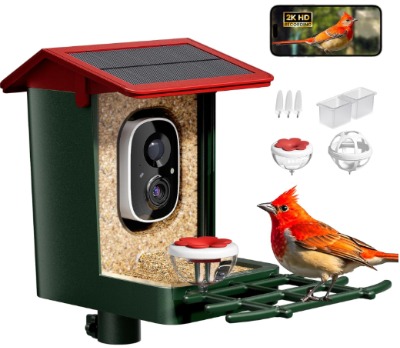
Product Description
This red smart feeder shares many features with other 2K models. It includes solar power, 2K HD video, AI bird species identification, instant arrival alerts, and a weatherproof design. The listing also pitches it as a gift for bird lovers, and the bright red body backs that up.
Red is a cheerful color, and it stands out in a green yard. Some people like that pop of color. Others prefer a quieter shade that blends in.
Best Use Cases
This one works well as a gift. It looks fun out of the box, and the “effortless birdwatching” idea suits newcomers. Think of a parent, grandparent, or a friend who loves their garden but does not want complicated gadgets.
It also fits balconies, small patios, and medium backyards. Anywhere you want to add a little bird activity and a little color.
Key Features Explained Simply
- Solar power: The feeder charges itself in daylight, so you rarely plug it in.
- 2K HD video: Clear enough to see feather patterns and bird behavior.
- AI species ID: The app suggests a bird name after each visit.
- Instant arrival alerts: You get a notification when a bird shows up.
- Weatherproof design: Built to handle normal rain and outdoor conditions. Heavy storms and freezing weather still call for care.
Real-Life Usage Insight
A gift like this works best when the setup is easy. Many buyers hang a feeder like this within a day, then check the app a few times a day at first. The excitement fades into a calm routine, where you glance at the alerts during breaks.
Bright colors can matter to birds, too. Some birds are wary of new, bold objects. A red feeder might take a bit longer to attract regular visitors than a green or brown one. Adding a little seed on the ground below can help birds notice it.
If you give this as a gift, include a note about the Wi-Fi band and the sun requirement. It saves the receiver from a rough first evening.
Pros
- Fun, gift-ready look
- 2K video is clear and enjoyable
- AI ID helps beginners learn species
- Weatherproof build for outdoor use
- Solar charging keeps maintenance low
Cons
- The bright red color might look loud in a natural yard
- Seed capacity details are less clear from the listing
- AI ID can slip on tough shots
- App features and storage terms are worth checking before you buy
Performance Discussion
Video quality sits at the same level as the HARYMOR, so the viewing experience is similar. Daytime clips look clean, and live view works well when Wi-Fi is steady. Night or low-light footage is limited on most feeders of this type, since birds mostly visit in daylight anyway.
The AI is helpful but not perfect. It does well with common backyard birds such as sparrows, finches, chickadees, and cardinals. It can struggle when two birds appear at once or when a bird turns away from the lens.
Solar charging should hold up well with a few hours of direct sun each day. Cloudy weeks can drain the battery, so a spot with open sky is a good idea.
Ease of Use
The “effortless” promise is mostly fair. The physical setup is easy, and the app guides you through pairing. The learning curve is small, even for people who rarely use smart devices.
The main hurdle, again, is Wi-Fi. If the feeder hangs out of range, the experience suffers no matter how good the camera is.
Value for Money
For a beginner or a gift, this feeder gives you the main smart features without extra complexity. You get the 2K camera, AI ID, and solar power in a friendly package. The value is solid if you like the color and you check the app terms. If you want a bigger seed tank or sharper video, other models here do more.
3. Kiwibit Solar Smart Bird Feeder with Camera (4K HDR Live Video, AI Bird ID)
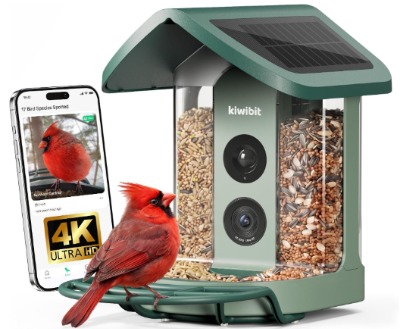
Product Description
The Kiwibit Solar Smart Bird Feeder steps up the video quality with 4K HDR live video. It keeps the AI bird ID and solar charging, so you get the same smart features with a sharper picture.
HDR matters outdoors. Backyards have bright sky, dark shade, and glare on feathers all at once. HDR tries to balance those extremes so bright areas do not wash out and dark areas do not turn muddy.
Best Use Cases
This feeder is built for people who care about picture quality. If you love close-up detail, like the sheen on a hummingbird’s throat or the tiny stripes on a sparrow, 4K gives you more to look at.
It also suits anyone who wants to share clips on a bigger screen. A 4K feed looks better on a tablet, laptop, or TV than a lower-resolution one.
Key Features Explained Simply
- 4K HDR live video: A very detailed picture with better balance between bright and dark areas.
- AI bird ID: The app names the bird after it visits.
- Solar power: The panel keeps the battery topped up during the day.
- Live view: You watch the feeder in real time from your phone.
Real-Life Usage Insight
In a sunny yard, an HDR camera shines. Birds often sit in dappled light, with bright patches and deep shadows across their bodies. A basic camera can blow out the bright spots. HDR helps keep feather color more natural.
A higher resolution also helps when you zoom in. You can crop a video frame and still keep a decent image. That is handy for sharing a cute moment or identifying a tricky bird yourself.
There is a trade-off, though. 4K video uses more data, so it needs a stronger Wi-Fi link to stream smoothly. In a weak-signal spot, you might see buffering or delays, and a lower-resolution feeder would feel smoother.
Pros
- Very sharp 4K picture
- HDR helps with bright and shady yards
- AI ID makes learning birds easier
- Solar power cuts down on charging chores
- Great for zooming and sharing clips
Cons
- Needs stronger Wi-Fi for smooth streaming
- Larger video files can use more storage and data
- Often costs more than 2K models
- Sharp video does not fix poor placement or weak sun
Performance Discussion
The main performance gain here is image detail. In good light, 4K footage shows fine feather texture and eye detail that 2K cannot match as well. Color tends to look more lifelike with HDR, though results still depend on lighting and lens quality.
Streaming performance depends heavily on your network. With strong Wi-Fi, live view should feel smooth. With weak Wi-Fi, expect lag. If your router sits far from the feeder, a Wi-Fi extender can help.
AI ID quality depends on the image you feed it. A sharper picture gives the AI more to work with, so identification might improve a little. It will still miss now and then, and that is normal for this kind of tool.
Battery life with solar charging should be fine in sunny spots. Higher resolution can use more power, so shady yards might see slower charging. Place the feeder where the panel gets good sun.
Ease of Use
Setup follows the usual smart feeder routine. Charge it, pair it with the app, connect Wi-Fi, fill it up, and hang it. The steps are easy, though beginners should take their time with the Wi-Fi part.
Using the app day to day is simple. You open it, tap live view, or scroll through alerts and clips.
Value for Money
If you love picture quality, this feeder gives you a clear upgrade over 2K models. You pay a bit more for that sharper view. The value feels strong for hobbyists and photo lovers. If you only glance at your phone for quick alerts, the extra detail might not matter enough to justify the price.
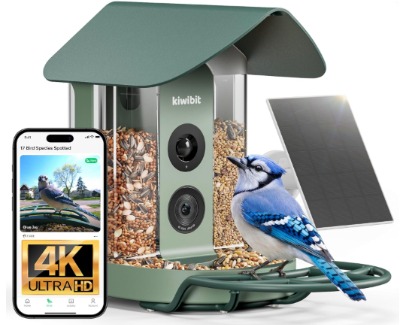
4. Kiwibit Bird Feeder with Camera 4K (Solar Powered, 8MP Photos, Smart AI ID)
Product Description
This second Kiwibit model focuses on both 4K video and 8MP photos. It runs on solar power and includes smart AI bird identification. The photo feature is the main difference from the other Kiwibit feeder.
Still photos are useful. A video clip is great for behavior, but a sharp photo is perfect for printing, sharing, or keeping a bird journal.
Best Use Cases
This feeder suits bird photography fans who do not want to carry a camera outside. You can let the feeder capture images all day and then review the best ones at night.
It also works for people who keep a species list. Photos make it easy to log what showed up and when. Teachers, parents, and nature clubs can use the pictures as simple learning tools, too.
Key Features Explained Simply
- 4K video: A highly detailed moving picture.
- 8MP photos: About eight million pixels per image, which is enough for sharp phone viewing and decent prints.
- Solar power: The battery recharges from sunlight.
- Smart AI ID: The app suggests a species name for each visit.
Real-Life Usage Insight
Photo mode changes how you use the feeder. Instead of scrubbing through video to find a good moment, you scroll through a gallery of snapshots. That feels faster and more relaxed.
Still, a camera that snaps photos on motion can capture some odd frames. You might get a blurred wing, a bird leaving the frame, or an empty perch. That is normal, and you simply delete the duds. Over time, you will build a small collection of great shots.
Good placement helps a lot. A perch with clean background, like leaves or a plain fence, makes bird photos look much better than a cluttered background.
Pros
- 8MP photos are great for keepsakes and sharing
- 4K video gives strong detail
- AI ID adds a learning element
- Solar charging helps with low upkeep
- Good fit for bird journals and classroom use
Cons
- Photo and video files can add up in storage
- Needs a steady Wi-Fi link for smooth uploads
- Some photos will be blurry or empty, as with any motion camera
- Price might be higher than basic 2K feeders
Performance Discussion
The photo quality is a nice step beyond video frames. Video stills are often softer, while a true photo mode can capture more detail. In bright daylight, 8MP images can look sharp and rich.
Video performance matches the other Kiwibit in spirit. You get high detail, and you need good Wi-Fi to enjoy it fully. Both photos and videos upload through the app, so a weak connection can slow everything.
AI identification works the same way as on other models. A clear photo gives the AI a better shot at naming the bird. Even so, treat the answer as a strong hint and not a promise.
Storage and app terms are worth checking. Some smart cameras keep clips on a card or the cloud, and some cloud features might cost extra. Read the listing details before you buy so nothing surprises you later.
Ease of Use
Setup is about the same as the other smart feeders here. The photo feature adds a small learning curve, because you will want to find the settings that suit your yard. Once you do, it runs on its own.
Browsing a photo gallery is easy and feels natural for anyone used to a phone camera roll.
Value for Money
This model offers a nice mix for people who want both video and high-quality photos. If you enjoy collecting bird pictures, the extra photo feature adds real value. If you only care about live viewing, you might prefer to save money with a simpler model.
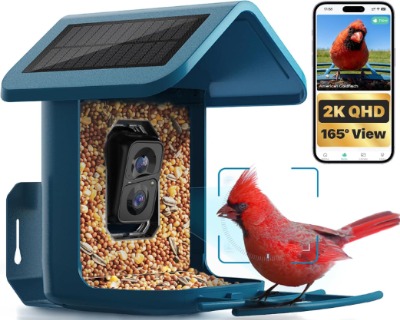
5. Smart Bird Feeder with Camera, Solar Powered, 2K Live Stream for Backyard
Product Description
This feeder keeps things simple. It offers a solar-powered design and 2K live streaming for backyard birdwatching. The listing focuses on the core idea: hang it up, watch the birds, and enjoy the stream.
Simple can be a good thing. Not everyone needs 4K, photo modes, or big hoppers. Many people just want a reliable way to see birds visit.
Best Use Cases
This feeder fits beginners and casual watchers. It works well for a first smart feeder, a small yard, or a patio setup. It also suits anyone who wants to test the idea before spending more on a high-end model.
Families with young kids may like it too. The live stream makes for a fun shared activity, like watching a tiny nature show.
Key Features Explained Simply
- 2K live stream: You can watch the feeder in real time from your phone.
- Solar power: The battery charges in daylight, so you rarely plug it in.
- Backyard design: Made for typical outdoor hanging and everyday weather.
Real-Life Usage Insight
For a simple feeder, the daily routine is easy. You fill it, hang it, and check the stream when you have a free moment. Many buyers like opening the app during a quiet lunch break.
Since the listing is brief, it is smart to check which extra features come with it. Look for AI bird ID, alert options, seed capacity, and storage terms. Some details are not clear from the short title, and you want to know them before you buy.
As with every smart feeder, placement drives results. A feeder near cover, like a tree or shrub, tends to attract more birds. A spot with open sky helps the solar panel. A spot near your home helps Wi-Fi.
Pros
- Clear 2K live streaming for everyday viewing
- Solar charging lowers upkeep
- Simple concept that suits beginners
- Often a good entry point for the hobby
- Easy to share with the whole family
Cons
- The listing gives fewer feature details than others
- AI ID and alerts need confirming before purchase
- Likely lacks extras like 4K or dedicated photo mode
- Seed capacity and build details need a closer look
Performance Discussion
The 2K stream gives a good picture for most uses. On a phone screen, it looks crisp. You can enjoy the birds, see their colors, and follow their behavior with no trouble.
Performance in poor Wi-Fi spots will be limited, as with every product here. Good signal strength matters more than the extra pixels. A 2K feeder with strong Wi-Fi often feels better than a 4K feeder with weak Wi-Fi.
Solar performance depends on sun. If the panel gets steady light, the battery should keep up with normal use.
Ease of Use
Ease of use is a strong point. A simple feeder tends to have a simple app and fewer settings. Beginners usually find it friendly, and it keeps the hobby fun instead of technical.
Value for Money
If the price is lower than the other models, this feeder can be a smart starter pick. You get the core experience, which is live bird viewing with solar power. Before buying, compare the missing details with the other products, so you know whether you are getting AI ID, alerts, and a decent seed tank. If those features are included, the value is very good for a first purchase.
Comparison Insights: How the Five Feeders Stack Up
Now that each feeder has its moment, a side-by-side view helps. These products share a lot of DNA, so the differences come down to a few key points.
Video Quality
The two Kiwibit models lead on picture detail, thanks to 4K. The HARYMOR, the red feeder, and the simple 2K model all sit at 2K. For phone viewing, 2K looks great. For larger screens or zooming, 4K pulls ahead.
Photo Capture
Only the Kiwibit 8MP model highlights dedicated photos. If you want pictures to print, share, or keep, that feature matters. Otherwise, video clips from any of the other feeders will do.
Seed Capacity
The HARYMOR clearly states a 2L capacity, which is a real plus for fewer refills. The other listings are less clear, so check them if refilling often would bother you.
Ease of Setup
All five feeders follow similar steps. The simple 2K model and the red feeder lean toward beginner friendliness. The 4K models need a stronger Wi-Fi link, which can add a few more steps for some homes.
Look and Style
The green HARYMOR blends into nature. The red feeder stands out and doubles as a gift. The Kiwibit models and the simple 2K feeder offer more neutral looks, though the listings do not spell out colors.
Price and Value
Prices change often, so look at the current listing. As a rule, 4K and photo features cost more than 2K. If budget matters most, the simple 2K feeder or the red 2K model might be the easiest on your wallet. If you want the best picture, the Kiwibit models earn their price.
Quick Winners by Category
- Best for fewer refills: HARYMOR Smart Bird Feeder
- Best for gifting: The red smart feeder
- Best picture quality: Kiwibit Solar Smart Feeder (4K HDR)
- Best for photos: Kiwibit Feeder with 8MP Photos
- Best for beginners on a budget: The 2K live stream feeder
Buying Guide: What to Look For in a Bird Feeder Camera
A good purchase comes from knowing which features matter in daily life. Here are the key points to think about before you buy.
Video Resolution
Resolution tells you how sharp the picture looks. Common levels are 1080p, 2K, and 4K. Higher resolution gives more detail, but it also uses more data and needs stronger Wi-Fi.
For most people, 2K is plenty. If you love zooming in or watching on big screens, 4K is worth a look.
Wi-Fi Strength and Band
This is the most overlooked factor. A feeder with a weak signal will frustrate you. Walk to the spot where you plan to hang it and check your phone’s signal there.
Many smart cameras need a 2.4GHz Wi-Fi band. If your router mixes bands, the pairing step can get confusing. A quick look at your router settings can save time.
Solar Panel and Battery
Solar power sounds like magic, but it needs sunlight. A shady yard will not charge well. Look for a spot where the panel gets several hours of direct light. Also, check whether the feeder has a backup charging port, since long cloudy spells can drain the battery.
Seed Capacity
A bigger hopper means fewer refills. A smaller one keeps seed fresher and the feeder lighter. If you travel or have a packed schedule, a larger tank helps. If you want to keep seed fresh in damp weather, smaller can be smarter.
AI Bird Identification
AI ID is a great learning tool. It helps beginners name birds fast. Remember that it is not perfect. Rare birds, odd angles, and low light can trip it up. Use the AI as a friendly guide and double-check with a field guide when you feel unsure.
Alerts and App Quality
A good app makes the whole experience better. Look for easy live view, quick alerts, and simple clip browsing. Read reviews about the app, because a great camera with a clunky app can feel annoying.
Storage and Subscription Terms
Some smart cameras save clips on a memory card. Others use cloud storage, and some cloud features come with a fee. Check the listing and the brand’s support pages, so you know what is free and what costs extra.
Weatherproofing
Your feeder will face rain, wind, heat, and cold. Look for a weatherproof rating or description. Even then, protect it from extreme storms when you can, and clean it often.
Build and Weight
A full seed tank adds weight. Make sure your hook, branch, or pole can handle it. A strong mount also keeps the camera steady, which helps video quality.
Ease of Cleaning
Dirty feeders can spread disease among birds. Pick a design that you can open and wipe down without much fuss. Easy cleaning means you will actually do it.
Squirrel and Pest Protection
Squirrels love bird seed. A smart feeder can attract them just as much as a regular one. Think about a baffle, a smooth pole, or a hanging spot away from jumping points.
Where to Place Your Bird Feeder Camera for the Best Results
Placement shapes your whole experience. A great feeder in a poor spot will give poor results. These tips help you get it right.
- Hang it near cover. Birds feel safer close to trees or shrubs, so they visit more often.
- Keep it within Wi-Fi range. Near a window or an outdoor wall is often best.
- Give the panel sun. Face the solar panel toward the brightest part of the sky.
- Mind the background. A plain, leafy backdrop makes better video and photos.
- Avoid window collisions. Place it either very close to a window or well away from it, to lower the chance of bird strikes.
- Keep it away from jump points. Squirrels can leap several feet, so give them no easy launch pad.
- Aim for head height or a bit higher. That keeps the view natural and helps with cleaning.
Give birds time to adjust. A new feeder can sit quiet for a week or more before regular visitors arrive. Patience pays off.
Who Should Buy These Products?
Smart feeders are not for everyone, and that is fine. Here is a simple guide.
Beginners Who Want an Easy Start
If you are new to birdwatching, a smart feeder gives you quick wins. The AI ID helps you learn names, and the alerts keep you engaged. The simple 2K models are a gentle place to begin.
Busy People With Little Free Time
If your schedule is packed, you can still enjoy birds. Alerts and clips let you catch moments on your phone. A larger seed tank, like on the HARYMOR, cuts down on chores.
Photo and Video Lovers
If you enjoy sharp images, the Kiwibit models are made for you. The 4K HDR feeder suits video fans, and the 8MP photo model suits people who like to collect pictures.
Gift Buyers
For a friend, parent, or grandparent who loves nature, a smart feeder makes a thoughtful gift. The red model leans into that idea with its cheerful look. Add a bag of quality seed to make the present feel complete.
Families and Teachers
Kids learn fast when they can see animals up close. A smart feeder turns a backyard into a classroom. The live stream works well for family time or a school project.
People Who Might Skip This
If you have no Wi-Fi near your yard, a smart feeder will frustrate you. If you have heavy shade all day, solar charging will struggle. And if you only want a quiet, low-tech hobby, a regular feeder and a pair of binoculars might suit you better.
Common Mistakes to Avoid
Many problems with smart feeders come from small mistakes. Avoid these, and your experience will be much smoother.
Ignoring Wi-Fi Range
This is mistake number one. People hang the feeder in the perfect spot, then find the signal is too weak. Test the signal first, and add an extender if needed.
Hanging It in Deep Shade
Solar panels need light. A shady spot leads to a weak battery and missed clips. Check how the sun moves across your yard before you pick a spot.
Expecting Instant Visitors
Birds are cautious. Some will find your feeder in a day, and others will take a week or two. Do not give up early. A little seed on the ground nearby can help draw attention.
Trusting the AI Blindly
The AI is clever, but it makes mistakes. If a result seems odd, compare it with a field guide or a trusted bird app. Treat it as a helpful hint.
Skipping Cleaning
Dirty feeders and old seed can harm birds. Clean the feeder often, especially in warm or damp weather. Throw out wet or moldy seed right away.
Using the Wrong Seed
Different birds like different seed. Black oil sunflower seed attracts a wide range of birds and is a safe starting point. Avoid cheap mixes full of filler, since birds often toss those on the ground.
Forgetting About Squirrels
Squirrels can chew, shake, and raid a feeder fast. Plan your placement with them in mind, and use a baffle if needed.
Overlooking App Terms
Some features, like cloud storage, can carry a fee. Read the details before you buy, so you can compare the real cost of each feeder.
Overfilling a Feeder in Slow Seasons
A big tank is handy, but seed can go stale if birds eat slowly. Fill it partly when traffic is low, and keep seed fresh.
Mounting It on a Weak Hook
A full feeder with a camera and a solar panel has some weight. A flimsy hook can bend or fall. Use a strong pole or a sturdy branch.
Tips to Get More Birds and Better Footage
A few small habits can improve your results quickly.
- Add a water source. Birds love a clean birdbath, and it brings more variety.
- Offer the right seed. Try black oil sunflower, safflower, or nyjer, depending on local birds.
- Keep the lens clean. Dust, smudges, and water spots hurt video quality.
- Check the angle. Adjust the camera so birds land fully in the frame.
- Review alerts at set times. This keeps the hobby fun and stops notification overload.
- Trim nearby branches. Moving leaves can trigger the motion sensor again and again.
- Stay consistent. Regular refills teach birds to count on your feeder.
Frequently Asked Questions
Do bird feeder cameras work at night?
Most birds visit during the day, so night use is not a main focus. Night footage on these cameras is usually limited, and many listings do not highlight it. Check the product details if night viewing matters to you.
Do I need a subscription?
It depends on the brand and the features. Some cameras store clips locally, and others offer paid cloud plans. Read the listing and the app details before you buy.
How accurate is the AI bird ID?
It is good with common birds in clear daylight shots. It is weaker with rare species, blurry images, or multiple birds in one frame. Think of it as a smart helper, not a final judge.
Will the solar panel keep the battery charged?
In sunny spots, usually yes. In shady yards or long cloudy periods, the battery can run low. Place the feeder where the panel gets steady light.
Can squirrels damage these feeders?
They can. Squirrels may chew plastic or shake the feeder to get seed. Use a baffle, a smooth pole, or a hanging spot away from jump points.
What seed should I use?
Black oil sunflower seed is a safe, popular choice. It draws many common backyard birds. Avoid moldy or wet seed, and clean the feeder often.
Is 4K worth it over 2K?
If you love detail, zooming, or big screens, yes. If you mainly watch on a phone, 2K looks great and can run smoother on weaker Wi-Fi.
Final Verdict: Which Is the Best Bird Feeder Camera?
All five feeders bring the same core promise: easy, modern birdwatching with solar power and smart features. The right pick depends on what you value most.
The HARYMOR Smart Bird Feeder is the best all-around choice for everyday life. Its 2L capacity, 2K video, and solar charging make it low-effort and friendly. If you want fewer refills and steady performance, start here.
The red smart feeder is the best gift pick. It offers the key smart features in a cheerful package, and it suits first-time bird lovers. Just check the app terms and seed capacity before you buy.
The Kiwibit Solar Smart Feeder with 4K HDR is the best choice for picture quality. If you care about detail and rich color, it delivers a clear step up from 2K. Make sure your Wi-Fi can handle it.
The Kiwibit Feeder with 8MP Photos is the best pick for photo fans. It blends sharp video with high-quality still images, which is ideal for keepsakes, journals, and sharing.
The simple 2K live stream feeder is the best starter option for beginners. It keeps things easy and affordable, though you should confirm which extra features come included.
If you want one clear recommendation for most people, go with the HARYMOR for its balance of capacity, quality, and low upkeep. If picture quality is your top goal, go with the Kiwibit 4K HDR feeder.
Whichever you pick, remember that good placement, strong Wi-Fi, and fresh seed matter just as much as the camera. Set those up well, give the birds a little time, and your backyard will soon feel like your own private nature show.



One Comment