
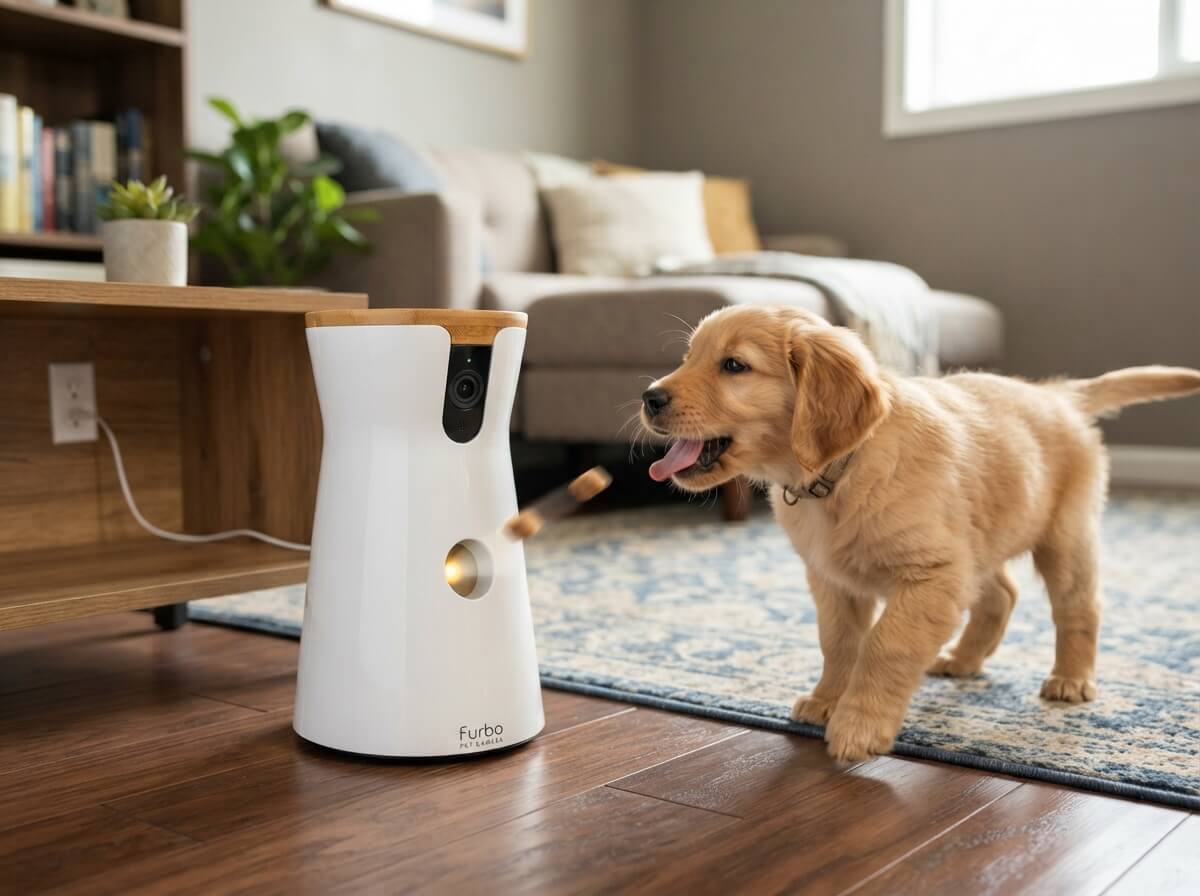
5 Best Pet Camera With Treat Dispenser In 2026
If you leave your dog or cat home alone for even a few hours, you probably check your phone more than you’d like to admit. That little worry in the back of your mind — is she barking? Is he chewing the couch again? — is exactly why pet cameras with treat dispensers have become so popular. These little gadgets let you see your pet, talk to them, and even toss a treat their way, all from an app on your phone.
In this roundup, we’re looking at five of the most talked-about pet cameras with treat tossing features on the market. We’ll break down what each one does well, where it falls short, who it’s actually built for, and how much value you get for your money. No fluff, no hype — just a straight-up look at what these cameras can and can’t do.
By the end of this guide, you’ll know exactly which pet camera fits your home, your pet’s personality, and your budget.
Why a Pet Camera With a Treat Dispenser Actually Matters
Before we jump into the reviews, let’s talk about why this category of gadget exists in the first place. A regular security camera lets you watch your pet. A treat-tossing pet camera lets you interact with your pet. That’s a big difference if your dog gets anxious when you leave, or your cat likes to test the limits of your patience while you’re at work.
These cameras usually combine a few core things:
- A wide-angle or rotating camera so you can see most of the room
- Two-way audio so you can talk to your pet and hear them too
- Night vision for low-light monitoring
- A motorized treat launcher that tosses a small treat on command or automatically
- A phone app that sends alerts when your pet barks, moves, or gets close to the camera
Some models add extra tricks like auto-tracking (the camera follows your pet around the room), AI bark detection, or a second wide-view camera for bigger homes. We’ll cover all of that as we go through each product.
Quick Comparison Table
| Product | Best For | Treat Toss | App Alerts | Subscription Needed | Price Range |
|---|---|---|---|---|---|
| Furbo 360° + Mini 360° Bundle | Multi-room homes | Yes (main cam) | Advanced | Yes | High |
| Furbo 360° Dog Camera (single) | Standard homes | Yes | Advanced | Yes | Mid-High |
| Furbo 360° + Mini Bundle (Home Security variant) | Homes wanting security + pet care in one | Yes (main cam) | Advanced | Yes | High |
| Generic 360° Pet Camera Treat Dispenser | Budget shoppers | Yes | Basic-Moderate | No | Low-Mid |
| TKENPRO 2K Pet Camera | Tech-focused buyers on a budget | Yes | Moderate | No | Low-Mid |
Now let’s get into the details.
1. Furbo 360° Dog Camera + Mini 360° Cam (2-Camera Bundle, Nanny Subscription)

This bundle pairs the full-size Furbo 360° camera with the smaller Furbo Mini 360°, giving you two cameras to cover more ground in your home. The idea here is simple: one camera watches the living room where your dog usually hangs out, and the second one covers a hallway, bedroom, or another spot your pet likes to wander into.
Product Description
The main Furbo 360° unit is the one with the treat tosser built in. It rotates to follow sound and movement, so it doesn’t just sit pointed at one corner of the room. The Mini 360° doesn’t dispense treats, but it does rotate and stream live video, which makes it a good secondary set of eyes. Both cameras connect through the Furbo app, and the whole setup runs on a required subscription plan called the Nanny plan, which unlocks the smart alerts and advanced features.
Best Use Cases
This bundle makes the most sense for larger homes, multi-pet households, or apartments with more than one room your pet has access to. If your dog splits time between the kitchen and a bedroom, having two cameras means you’re not missing half the action.
Key Features Explained Simply
- 360° rotation: The main camera turns on its own to track sound, so you don’t need to manually pan it around
- Treat tossing: You can launch a treat right from the app, and the camera even has an autonomous “Furbo Mode” where it tosses treats when it detects certain behaviors
- Dog Nanny AI: This is the subscription-powered brain of the system. It sends alerts for barking, staring at the camera, or being at a “person’s height” (jumping on furniture), and can also recognize your specific dog’s face over time
- Night vision: Both cameras switch to infrared automatically once the room gets dark
- Two-way audio: Talk to your pet through the app, and hear them bark back
Real-Life Usage Insight
Owners with dogs that get separation anxiety tend to lean on the barking alerts a lot, since they get a notification the moment their dog starts vocalizing rather than finding out only after coming home to a stressed pet. The second camera tends to get used less for treats and more just as an extra set of eyes, especially in homes with a nervous cat that hides in another room.
Pros
- Covers two rooms instead of one
- Strong bark and behavior detection once the subscription is active
- Sharp, clear video even in low light
- App is easy to navigate for beginners
Cons
- Locked into a subscription from day one, no real free tier
- Mini camera doesn’t toss treats, so it’s really just a monitoring add-on
- Two cameras mean two things to set up on your WiFi, which can be a hassle on weaker routers
- Higher upfront cost than single-camera options
Performance Discussion
Video quality holds up well in both daylight and dark rooms. The rotation motor is smooth and doesn’t lag much behind sudden movement. Treat accuracy is solid too — it lands close to the camera most of the time rather than flying across the room. Where it can stumble a bit is on very large routers with mesh WiFi setups, where the second camera occasionally takes longer to reconnect after a router restart.
Ease of Use
Setup takes about ten to fifteen minutes per camera, which adds up to closer to half an hour for the full bundle. The app walks you through WiFi pairing step by step, so even first-time smart home users can get through it without much trouble.
Value for Money
This bundle costs more than a single camera, and you’re required to keep paying for the subscription to use most of the smart features. For a two-dog or multi-room household, the price is reasonable given what you get. For a single dog in a one-bedroom apartment, it’s probably more camera than you need.
2. Furbo 360° Dog Camera (Single, Subscription Required, 3-Month Minimum)

This is the standalone version of the Furbo 360° camera, without the second Mini unit. It’s the more common pick for people who just want one solid camera in the main room their dog spends time in.
Product Description
Functionally, this is the same core camera as the one included in the bundle above — 360° rotation, a treat tosser, night vision, and two-way audio — just sold on its own. The subscription here has a three-month minimum commitment, after which you can cancel any time, so it’s a bit more flexible than the “new subscription required at setup” bundles.
Best Use Cases
Single-room homes, studio apartments, or households where your dog mostly stays in one main area during the day. It also works well as a starter option if you’re new to pet cameras and don’t want to commit to a two-camera setup right away.
Key Features Explained Simply
- Rotating treat tosser: Aims and tosses treats toward wherever the camera is pointed, controlled from the app
- Home security alerts: On top of pet monitoring, it can double as a light home security camera, flagging unusual motion when you’re away
- Bark alerts: Sends a push notification the moment it picks up barking, so you’re not left guessing
- Wide 360° field of view: One camera can basically cover an entire average-sized room without needing to be repositioned
Real-Life Usage Insight
People who work in an office and check their phone on lunch breaks tend to use this camera almost like a quick “hello” check-in — a two-way audio call and a treat toss to break up the dog’s day. Cat owners have also picked this one up, mostly to keep an eye on cats that get into cabinets or counters while nobody’s home.
Pros
- Simpler setup than the two-camera bundle
- Doubles as light home security, not just pet monitoring
- Three-month subscription minimum gives more flexibility than a permanent lock-in
- Reliable bark detection and clear two-way audio
Cons
- Still requires an ongoing subscription for full functionality
- Only covers one room, so blind spots exist in larger homes
- Treat capacity is limited, so it needs refilling every few days depending on use
- Wall or floor mounting isn’t included, so placement options are a bit limited out of the box
Performance Discussion
The rotation and tracking work well for typical living rooms. Bark alerts arrive quickly, often within a second or two of the actual bark, which matters if you’re trying to calm an anxious dog through the app in real time. Night vision is clean and doesn’t wash out details the way some budget cameras do.
Ease of Use
Setup is straightforward: plug it in, download the app, connect to WiFi, and you’re basically ready to go. The interface is clean, and treat tossing has a simple one-tap control, so there’s no learning curve for basic use.
Value for Money
Given the subscription requirement, this camera works out to be a bit pricier over time than one-time-purchase options. That said, the security features and reliable alerts make it a reasonable pick if you want a single, dependable camera and don’t mind paying monthly for the smart features.
3. Furbo 360° Dog Camera + Mini (2-Camera Bundle, Home Security & Dog Safety Variant)
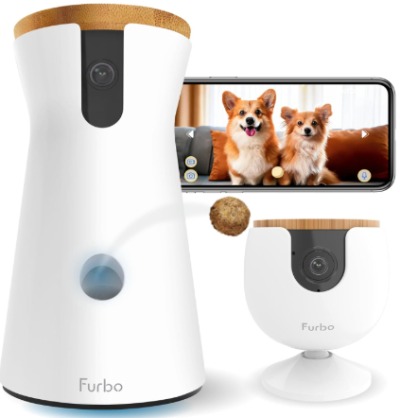
This is another two-camera bundle from the same product family, positioned a bit more toward home security on top of pet monitoring. The core hardware is nearly identical to the first bundle we covered, but the marketing and alert focus lean into “home security alerts” alongside dog safety.
Product Description
You get the same 360° main camera with the treat tosser, paired with the Mini 360° secondary camera. The Nanny subscription plan unlocks person detection, package alerts, and general home security notifications in addition to the usual bark and behavior alerts for your dog.
Best Use Cases
This setup suits people who want one system doing double duty — keeping an eye on the dog and also acting as a general home security setup while they’re out. It’s a good fit for homes without a separate security camera system already in place.
Key Features Explained Simply
- Person detection: The camera can tell the difference between your pet moving and an actual person entering the room, which cuts down on false alerts
- Home and pet combined alerts: One app handles both categories, so you’re not juggling two separate systems
- Treat tossing with autonomous mode: Same as the other Furbo units, it can toss treats automatically based on triggers you set
- Dual camera coverage: The Mini covers a second area, useful for entryways or hallways where a person might walk through
Real-Life Usage Insight
Renters and homeowners who don’t already have a dedicated security system tend to like this variant the most, since it saves them from buying a separate camera for general home monitoring. Dog owners specifically use the person-detection feature to know when a dog walker or pet sitter has actually shown up, not just guess based on the time.
Pros
- Combines pet monitoring and light home security in one app
- Person detection reduces unnecessary notifications
- Same reliable treat-tossing and rotation as other Furbo models
- Two cameras give broader coverage for entryways and living spaces
Cons
- Same subscription requirement as the rest of the lineup
- Home security features aren’t a full replacement for a dedicated security system
- Higher price point due to the bundle and subscription combo
- Mini camera still lacks its own treat dispenser
Performance Discussion
Person detection is fairly accurate in well-lit rooms, though it can occasionally mix up a large dog standing on hind legs with a person, especially in dim lighting. Aside from that quirk, the core video and audio performance mirrors the other Furbo models — smooth, clear, and responsive.
Ease of Use
Setup mirrors the other bundle, taking around twenty to thirty minutes total for both cameras. The app groups pet alerts and security alerts into separate tabs, which keeps things from feeling cluttered.
Value for Money
If you were already planning to buy a separate security camera and a pet camera, this bundle can actually save you money by combining both jobs into one subscription and one app. If you only care about pet monitoring and have no interest in home security features, you’re paying for functionality you won’t use much.
4. Pet Camera Treat Dispenser (Generic 360° Model, No Subscription)
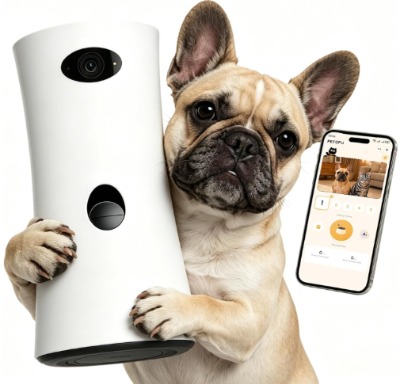
This is a budget-friendly, no-subscription option that covers the core basics: live video, treat tossing, two-way audio, and motion alerts, all without a monthly fee.
Product Description
This camera connects over WiFi (supporting both 5G and 2.4G bands) and streams to a phone app. It has a 360° rotating base, a built-in treat dispenser, night vision, and motion-based alerts. Unlike the Furbo models, there’s no subscription required to access the app’s core features, which makes it a much lower commitment purchase.
Best Use Cases
Great for anyone testing out the whole “pet camera with treat dispenser” idea for the first time without wanting to commit to a subscription. It also works well for cat owners who mainly want basic check-ins and occasional treat tossing rather than advanced AI behavior tracking.
Key Features Explained Simply
- No subscription needed: All the main features — live view, treat tossing, two-way audio — work right out of the box with no recurring fee
- Dual-band WiFi support: Works with both 2.4G and 5G networks, which helps with connection stability depending on your router setup
- Remote treat tossing: Control treat launches directly from the app with a simple button
- Motion alerts: Sends a notification when it detects movement in the room, though it’s less refined than AI-based bark or behavior detection
Real-Life Usage Insight
Budget-conscious pet owners and college students living in apartments tend to gravitate toward this type of camera, since it gets the job done without asking for a monthly payment. It’s also common among people who just want a second camera as backup coverage in a room the main premium camera doesn’t reach.
Pros
- No subscription fees at all
- Dual-band WiFi improves connection reliability
- Simple, no-frills app that’s easy to figure out
- Noticeably lower price than premium subscription-based models
Cons
- Motion detection is more basic and can trigger false alerts from shadows or light changes
- No advanced AI behavior recognition like bark-specific alerts
- Build quality feels less premium compared to established brands
- Customer support and firmware updates can be less consistent than bigger brands
Performance Discussion
Video quality is decent for the price, though it doesn’t quite match the sharpness of the premium options in low light. The treat tosser works reliably for short distances, though accuracy can dip if the camera isn’t placed on a flat, stable surface. Motion alerts are a bit trigger-happy at first, but most users find that adjusting the sensitivity settings in the app cuts down on false alarms.
Ease of Use
Setup is simple and doesn’t require creating extra accounts beyond the basic app registration. The whole process usually takes under ten minutes from unboxing to first treat toss.
Value for Money
For the price, this camera delivers solid core functionality without asking for ongoing payments. If you’re mainly looking for basic monitoring and treat tossing without needing advanced AI features, this is one of the better value picks in this roundup.
5. TKENPRO 2K Pet Camera Treat Dispenser
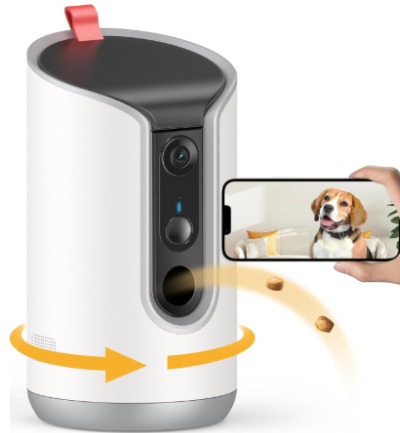
The TKENPRO model steps things up slightly with a 2K resolution camera, auto-tracking, and the same treat-tossing and two-way talk features found in other budget models, all without a subscription requirement.
Product Description
This camera offers a 2K resolution feed, noticeably sharper than standard 1080p budget cameras, along with 360° viewing, dual-band WiFi, and an auto-tracking feature that follows your pet’s movement around the room. It also includes a treat dispenser and two-way audio, and works through a dedicated phone app without locking core features behind a paywall.
Best Use Cases
This one is a strong fit for people who want sharper video quality without paying premium subscription prices. It also suits active pets that move around a lot, since the auto-tracking feature keeps the camera pointed at them instead of a fixed corner of the room.
Key Features Explained Simply
- 2K resolution: Delivers a noticeably clearer picture than standard budget cameras, useful for actually seeing what your pet is doing rather than a blurry outline
- Auto-tracking: The camera moves on its own to follow your pet as they walk around, so you don’t miss the action if they leave the frame
- Dual-band WiFi (5G & 2.4G): Offers flexibility for different home network setups
- Remote treat tossing and motion alerts: Standard features that let you toss treats and get notified of movement, similar to the other budget option in this list
Real-Life Usage Insight
Owners of more active or younger pets — puppies and kittens especially — tend to appreciate the auto-tracking feature the most, since these pets rarely sit still in one spot. People upgrading from a basic 1080p camera to something sharper without jumping into a subscription plan often land on this one specifically for the resolution bump.
Pros
- Sharper 2K video compared to typical budget cameras
- Auto-tracking keeps active pets in frame
- No subscription required for core features
- Reasonable price for the added tracking and resolution upgrade
Cons
- Auto-tracking can occasionally lag behind fast movement
- App interface isn’t as polished as bigger-name brands
- Treat dispenser holds a smaller quantity, meaning more frequent refills
- Less brand recognition, so long-term support and updates are less predictable
Performance Discussion
The 2K feed genuinely stands out in this lineup, especially for checking small details like whether your cat is chewing on something they shouldn’t be. Auto-tracking works well for slow to moderate movement but can lose track briefly during quick bursts of activity, like a dog sprinting after a toy. Audio quality on the two-way talk feature is clear, though slightly quieter than the Furbo models at max volume.
Ease of Use
Setup follows the same general pattern as other WiFi pet cameras: download the app, scan a QR code, connect to WiFi, and mount or place the camera. Most users get through the process in under fifteen minutes.
Value for Money
Given the 2K resolution and auto-tracking, this camera offers strong value for the price, especially for people who want a noticeable step up in video quality without paying a monthly subscription. It’s one of the better all-around budget picks in this list.
Comparison Insights
Looking at all five products side by side, a few patterns stand out.
The three Furbo options share the same core hardware and rely heavily on their subscription plan to unlock the smartest features, like bark-specific alerts, facial recognition for your dog, and person detection. If you don’t subscribe, you lose a good chunk of what makes these cameras stand out from cheaper alternatives. The trade-off is that the AI behavior detection genuinely works well and can catch things a basic motion sensor would miss, like distinguishing a bark from a doorbell sound.
The two budget options — the generic 360° camera and the TKENPRO 2K — skip the subscription model entirely. That’s a big plus for anyone who doesn’t want another monthly bill. The trade-off is less refined alert detection and, in the case of the generic model, a slightly lower resolution feed. The TKENPRO closes part of that gap with its 2K camera and auto-tracking, making it the strongest non-subscription pick in this group.
If coverage across multiple rooms matters to you, the two Furbo bundles are the only ones offering a second camera out of the box. Just remember that second Mini camera doesn’t toss treats on its own, so it’s really there for extra visibility rather than extra interaction.
Buying Guide: What to Look For
Before you settle on a pet camera with a treat dispenser, run through these points:
Subscription or no subscription. Decide upfront if you’re okay paying monthly for smarter alerts, or if you’d rather have a one-time purchase with more basic (but still functional) features.
Video resolution. Standard 1080p is fine for general monitoring, but 2K makes a real difference if you want to catch small details, like your cat pawing at a plant or a puppy chewing something they shouldn’t.
Treat capacity and refill frequency. Smaller dispensers need refilling more often, so factor that into your daily routine if you plan on tossing treats multiple times a day.
WiFi compatibility. Check if the camera supports both 2.4G and 5G bands, especially if your home router broadcasts on both. This affects connection stability more than people expect.
Field of view and rotation. A 360° rotating camera covers more of a room than a fixed-angle one, which matters if your pet moves between different spots.
Alert accuracy. Basic motion alerts can trigger on shadows, curtains moving, or lighting changes. AI-based bark and behavior alerts tend to be more precise but usually require a subscription.
App usability. A cluttered or confusing app makes even a great camera frustrating to use daily. Look for reviews that specifically mention how easy the app is to navigate.
Two-way audio quality. Some cameras have quieter speakers or slight audio delay, which can matter if you’re trying to calm a stressed pet in real time.
Who Should Buy These Products
Multi-pet or multi-room households should lean toward the Furbo bundles, since the second camera adds coverage that single-camera models can’t match.
First-time pet camera buyers who aren’t sure they’ll use it long-term might prefer the no-subscription options, so they’re not locked into ongoing payments for a device they’re still testing out.
Owners of anxious or vocal dogs benefit most from the Furbo lineup’s bark-specific AI alerts, which catch behavior patterns that basic motion sensors miss entirely.
Budget-focused shoppers who still want solid video quality should look closely at the TKENPRO, since it offers a resolution upgrade without asking for a subscription.
Renters or apartment dwellers without a dedicated security system might get more overall value out of the Furbo bundle that combines home security alerts with pet monitoring, since it covers two needs with one purchase.
Common Mistakes to Avoid
Ignoring the subscription cost long-term. A camera that looks affordable upfront can add up over a year or two once you factor in the monthly plan. Always calculate the total cost over time, not just the sticker price.
Placing the camera too high or too low. For the best field of view and treat-tossing accuracy, most cameras work best at a mid-height position, roughly at your pet’s eye level or slightly above it, rather than mounted near the ceiling.
Overusing the treat toss feature. It’s tempting to toss treats constantly through the app, but doing this too often can lead to overfeeding or your pet gaining unwanted weight. Treat the feature as an occasional reward, not a replacement for regular feeding.
Skipping the WiFi check. Not confirming your router’s band compatibility (2.4G vs 5G) before buying can lead to connection drops and frustration during setup.
Assuming all alerts are equally accurate. Basic motion alerts are more prone to false positives than AI-based bark or behavior detection. If constant false alerts bother you, this is worth checking in reviews before buying.
Forgetting about treat size and shape. Not every treat fits every dispenser. Cameras usually recommend specific treat sizes, and using the wrong ones can cause jams or dispensing failures.
Not testing the camera while still at home. Before fully relying on the camera while away for a full day, it helps to test it for a shorter period first to make sure alerts, video, and treat tossing all work as expected in your specific home setup.
Final Verdict
All five of these pet cameras get the core job done: watching your pet, letting you talk to them, and tossing a treat their way when you want to check in. The differences come down to how much you’re willing to pay monthly, how many rooms you need covered, and how sharp you want the video feed to be.
If you want the most advanced behavior detection and don’t mind a subscription, the single Furbo 360° camera is a solid, dependable middle-ground pick. If your home has more than one room your pet roams around in, either Furbo bundle makes more sense, with the security-focused bundle being the better pick if you also want general home monitoring.
For anyone who wants to skip the monthly fee entirely, the TKENPRO 2K stands out as the strongest budget option thanks to its sharper video and auto-tracking. The generic 360° camera is still a fair pick if you want the absolute lowest cost of entry and don’t mind slightly more basic alerts.
At the end of the day, the “best” pet camera with a treat dispenser really depends on your specific home, your pet’s habits, and how much ongoing cost you’re comfortable with. Use the comparison table and buying guide above to match your situation to the right pick, and you’ll end up with a camera that actually fits how you and your pet live day to day.

Hi, I’m Mary, the founder of PetGadgetPro.com. I’m a passionate pet lover with a special place in my heart for dogs and cats. I share practical advice and honest insights on pet gear to help pet parents make better choices. My dedicated research team studies products in depth, and our writers create reviews using trusted, authentic sources—so you can feel confident choosing the best for your pets.