

5 Best Pet Camera Robots In 2026
If you’ve ever worried about leaving your dog, cat, or other pets home alone, you’re not alone. The guilt of not being there when they need you is real. But what if you could check in on them anytime? What if you could actually talk to them and watch them play throughout the day?
That’s where pet camera robots come in.
These little moving cameras are changing how pet owners stay connected with their animals. They’re not just static cameras sitting in the corner. They roll around, follow your pets, and let you interact with them from anywhere in the world. It’s like having a friend watching over your furry buddies while you’re at work, on vacation, or just away for the day.
In this guide, I’ll walk you through the best pet camera robots on the market. I’ll break down what makes each one special, what they’re good at, and what they’re not so great at. By the end, you’ll know exactly which one is right for your home and your pets.
Why Pet Camera Robots Matter
Before we dive into specific products, let’s talk about why these gadgets have become so popular.
A regular pet camera is fine, but it’s stuck in one spot. You can see your dog on the couch, but what if they’re in another room? You have to install cameras everywhere, which gets expensive and messy.
A pet camera robot moves around. It can roll into different rooms. Many models can be controlled from your phone, so you can actually direct where the camera goes. Some robots even interact with your pets by playing sounds or dispensing treats.
These robots are great for:
- Keeping tabs on your dog or cat when you’re at work
- Checking on multiple pets across your home with one device
- Entertaining your pets while you’re away
- Monitoring elderly pets that might get into trouble
- Watching over your baby or young kids
- Detecting motion and suspicious activity in your home
The best part? Most of these robots have two-way talk features. You can speak to your pet, and they can hear you. Dogs often get excited when they hear their owner’s voice. Cats get curious. It’s a simple feature that makes a huge difference in how connected you feel.
What to Look for in a Pet Camera Robot
When I’m evaluating these products, I’m thinking about what actually matters to pet owners. Here are the main things to consider:
Video Quality: You want to see your pet clearly. 1080P is the basic standard. 2K is better if you have a larger space or want more detail.
Night Vision: Your pet might nap during the day or get up at night. Good night vision means you can see them anytime.
Movement and Control: Can you control the robot from your phone? Does it move smoothly? Can you direct it where you want?
Battery Life: How long does it run before it needs charging? Does it auto-charge?
Audio Features: Two-way talk is standard. Some robots have speakers for playing sounds or music.
Smart Features: Motion detection, video recording, treat dispensing, and custom facial expressions add a lot of fun.
Ease of Setup: If it takes an hour to set up, that’s annoying. Good products are quick to get running.
App Control: The mobile app should be intuitive and responsive. Controlling your robot should feel smooth.
Storage Options: Do they use cloud storage, local storage, SD cards, or a combination?
Price: The best camera robot is the one you’ll actually buy and use. Budget matters.
Enabot EBO SE FamilyBot: The Practical Choice

The Enabot EBO SE is the kind of product that does one job really well. It’s a 1080P movable robot that focuses on simplicity and reliability.
What It Is
This is a small robot that rolls around your home. It looks a bit like a hockey puck crossed with a robot—round, smooth, and cute. The 1080P camera gives you clear video of what’s happening in your house. The camera points down and forward, so you can see your pet and the space around them.
Best Use Cases
The EBO SE shines when you want a no-fuss mobile camera. It’s perfect if:
- You’re new to pet camera robots and want something straightforward
- You have a smaller apartment or single-story home
- You want a robot that won’t confuse you with too many features
- You’re on a tighter budget but don’t want to sacrifice quality
Key Features Explained Simply
1080P Video: The video quality is solid. You’ll see your pet clearly in good lighting. Colors look natural, and you won’t get a blurry picture when your dog is running around.
Battery Operation with Auto-Recharge: This robot runs on a battery, which is actually great because you don’t need cables all over. The auto-recharge feature means it heads back to its dock when the battery gets low. You set up the dock once, and it handles itself.
Night Vision: The infrared night vision lets you see in the dark. It’s not going to give you color at night, but you’ll see what’s happening. This is important if your pet likes to roam around after lights out.
2-Way Talk: You can talk through the robot, and your pet hears you. The speaker is clear enough that your dog or cat will recognize your voice. The microphone picks up their sounds too.
Local Storage: The EBO SE saves videos to local storage, which means your data stays on the device. You don’t need to worry about cloud subscriptions or hackers accessing your pet footage. This is actually a big selling point for privacy-conscious owners.
App Control: The mobile app lets you drive the robot around your home. It responds quickly to commands, and the interface is clean.
Real-Life Usage Insight
In practical use, the EBO SE feels like owning a little moving camera that actually works. The battery lasts a good stretch—most people report getting through a work day without needing a charge. The auto-dock is clutch. You don’t have to babysit it.
The robot moves at a decent speed. It’s not going to catch a running dog, but it can roll from room to room and keep up with a leisurely pet. The base is stable enough that it handles normal flooring well. Hard floors, tile, and short carpet all work fine. Thick plush carpet might slow it down slightly.
The night vision is particularly useful. If you’ve ever wondered what your pets do at night, now you can actually see. Most owners are surprised at how much their pets move around when they’re asleep.
Honest Pros and Cons
Pros:
- Simple and reliable—it just works
- Great battery life and auto-charging takes away the stress
- Privacy-friendly with local storage
- Affordable compared to fancier models
- Good build quality
- Night vision is effective
Cons:
- 1080P isn’t cutting-edge in today’s market
- Limited smart features compared to pricier models
- The app could use some design improvements
- No treat dispensing or other interactive features
- Might struggle on thick carpets
- No obstacle detection, so you need to clear the path
Performance Discussion
The EBO SE is honest about what it is. It doesn’t try to be everything. It’s a mobile camera that stays reliable and consistent.
Video performance is steady even in mixed lighting. The frame rate is smooth, so you’re not watching a choppy video feed. The connection between your phone and the robot is stable. Controlling it from across town works just as well as controlling it from the next room.
Battery performance is where the EBO SE impresses. Real-world usage shows that most owners get six to eight hours of active use before the robot needs to charge. The auto-dock works like a charm. Just place the dock in a convenient spot, and the robot finds its way back when the battery dips.
Ease of Use
Setup takes maybe fifteen minutes. Download the app, create an account, connect to WiFi, and you’re rolling. The robot itself is physically easy to use—just press the button and it starts moving.
The app is intuitive if a bit plain. You see a live feed, control buttons for movement, and a history of recordings. Nothing fancy, but nothing confusing either. Even people who aren’t tech-savvy can figure this out.
Value for Money
The EBO SE sits in the sweet spot of price and performance. It’s not the cheapest option, but it’s not premium-priced either. For a pet owner who wants a reliable mobile camera without paying for features they won’t use, this delivers excellent value.
You’re paying for simplicity, reliability, and a product that does exactly what it promises. In my opinion, that’s worth every penny.
Enabot EBO ROLA Mini: The Compact Alternative

Want something smaller? The ROLA Mini takes the EBO concept and shrinks it down. This isn’t a toy—it’s a full-featured robot that just happens to take up less space.
What It Is
The ROLA Mini is adorable. It’s genuinely cute in a way that people find charming. It’s smaller and lighter than the SE, which makes it easier to move around manually if you want to place it in different spots.
The 2K camera is a step up in resolution, which makes a real difference in image clarity.
Best Use Cases
The ROLA Mini is perfect when:
- You have a smaller space like an apartment or condo
- You want a more compact, less obvious robot
- You prefer high-resolution video
- You like the idea of a robot that’s less obtrusive
- You have tight hallways or small doorways
Key Features Explained Simply
2K Video: This is sharper than 1080P. You see more detail. Textures come through clearer. If you like to really see what your pet is doing, 2K is noticeably better.
Battery-Powered: Like the SE, this runs on batteries and doesn’t need to be plugged in all the time.
One-Touch Call Feature: This is a nice convenience. Instead of opening the app and navigating, you press a physical button to instantly call your pet. It plays a sound or your voice to grab their attention.
2-Way Talk: Just like the SE, you can have two-way conversations with your pets.
Night Vision: The infrared lets you see in the dark.
Motion Detection and Video Recording: The robot automatically records when it detects motion. This is great for checking in on activities you might have missed. The app sends you alerts, so you know something happened.
Real-Life Usage Insight
The ROLA Mini feels less intrusive in a home. It’s small enough that it doesn’t dominate a room visually. This matters more than you’d think. Visitors often don’t even notice it at first.
The 2K resolution is the big upgrade. If the SE gives you good clarity, the ROLA Mini gives you excellent clarity. You’ll notice the difference most when your pet is farther away from the camera. Details remain sharp instead of getting fuzzy.
The motion detection works well in practice. It’s responsive and doesn’t trigger false alarms very often. The video recording quality matches the live feed quality, so you get high-resolution clips of what happened while you were away.
Honest Pros and Cons
Pros:
- Smaller and more compact
- 2K resolution is noticeably sharper
- Motion detection and auto-recording add functionality
- One-touch call is convenient
- Less visually prominent
- Still offers solid battery life
Cons:
- Smaller size means slightly shorter battery life than SE
- More compact design might make it harder to spot in dim lighting
- No auto-dock (you have to manually charge it)
- Slightly more expensive than the SE
- Limited storage compared to some competitors
Performance Discussion
The ROLA Mini punches above its weight in terms of performance. The 2K camera performance is consistently good. The motion detection is smart enough to ignore minor movements like light changes, but catches real activity.
Battery performance is still strong, though not quite matching the SE’s endurance. Most users report five to seven hours of active use, which is still enough for a full work day.
Ease of Use
Setup is equally simple to the SE. The smaller size actually makes it easier to handle and position manually. The app is virtually identical to the SE’s app.
The one-touch call feature is genuinely useful and adds a touch of delight to the experience.
Value for Money
The ROLA Mini costs a bit more than the SE. You’re paying extra for the 2K resolution, the motion detection and recording features, and the more compact design. If high-resolution video matters to you, it’s worth it. If the SE’s 1080P is enough, you’ll save money and get similar core functionality.
Generic 1080P Pet Camera Robot: The Budget-Friendly Option

Sometimes you just want a working camera robot without paying premium prices. This 1080P option delivers exactly that.
What It Is
This is a straightforward pet camera robot. It’s similar in concept to the Enabot models but comes from a different manufacturer. It hits all the main features without adding frills.
Best Use Cases
This model is for:
- Budget-conscious pet owners
- Those testing whether a robot camera fits their lifestyle
- People who want basic functionality without extras
- Anyone comfortable with less-known brands
Key Features Explained Simply
1080P Video: Standard clear video. Not premium, but perfectly adequate for seeing what your pet is doing.
App Control: You can move the robot around from your phone.
Night Vision: Infrared night vision works just fine.
2-Way Talk: Speak to your pet and hear them back.
Motion Detection: Alerts you when something moves.
SD Card Storage: Videos save to an SD card, which you manage locally.
Real-Life Usage Insight
This robot works competently. It does what it claims without trying to impress you. For owners who just want to check in on their pets without overthinking the technology, this delivers.
The SD card storage approach is practical. You buy a card once (usually 32GB or 64GB), and you have plenty of space for days of recording. You pull the card when you want to review footage on a computer.
Honest Pros and Cons
Pros:
- Most affordable option
- Decent build quality
- All essential features included
- SD card storage is straightforward
- Good customer support from most sellers
Cons:
- No auto-charging (you charge manually)
- 1080P is basic by current standards
- Fewer smart features than premium options
- Less refined app experience
- Smaller brand means fewer reviews and less community support
- Battery life varies by model
Performance Discussion
Performance is consistent but modest. The robot moves smoothly and video quality is acceptable. Battery lasts reasonably well for the price point.
This isn’t a cutting-edge device. It’s competent and practical. If you keep your expectations realistic, you’ll be satisfied.
Ease of Use
Setup is simple. The manual might be less detailed than you’d like, but everything is straightforward. The app is functional if basic.
Value for Money
This option gives you maximum value if price is your primary concern. You get a working pet camera robot for less money. You sacrifice some refinement, polish, and advanced features, but the core functionality is solid.
1080P Pet Camera Robot with WiFi: The Connected Option
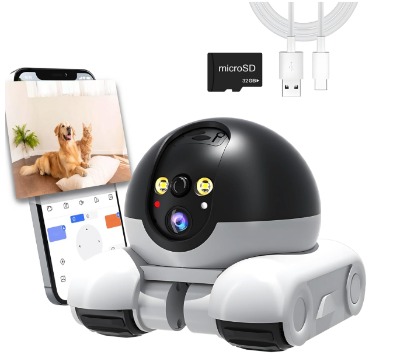
This version emphasizes connectivity and modern features. It’s another 1080P option but with a focus on being user-friendly and feature-rich.
What It Is
A pet camera robot designed to feel modern and responsive. It includes a 32GB SD card, so you’re ready to record immediately without buying extra storage.
Best Use Cases
This is ideal for:
- People who want a modern, connected experience
- Those who value convenience over saving money
- Anyone who wants everything included out of the box
- Owners who might use it for baby monitoring or home security too
Key Features Explained Simply
1080P Video: Clear, standard-resolution video.
App Control: Smooth, responsive app that feels modern and quick.
2-Way Talk: Clear speaker and microphone for two-way communication.
Motion Detection: Reliable motion alerts.
Night Vision: Good infrared performance.
WiFi Connectivity: Connects to your standard home WiFi network.
Included 32GB SD Card: Everything you need is in the box. No extra purchases required to start recording.
Real-Life Usage Insight
This robot feels like a complete package. Unboxing it, you have the robot, the charger, and the SD card. No scrounging around for accessories.
The app is noticeably more polished than budget options. Controls respond immediately. The interface looks modern. Streaming is reliable.
The included SD card typically holds one to two weeks of regular recording, depending on how much motion you have.
Honest Pros and Cons
Pros:
- Everything included—no extra purchases needed
- Modern, responsive app
- Good build quality
- Reasonable battery life
- SD card stays with the unit, so no separate storage headaches
- Good for multiple uses (pet, baby, security)
Cons:
- 1080P is still just standard
- No auto-charging
- Motion detection alerts can be frequent if you have an active household
- App requires decent WiFi signal
- Premium pricing compared to absolute budget options
Performance Discussion
This robot performs reliably. The WiFi connection is stable. The app maintains a good video stream even on average WiFi connections.
Battery lasts six to eight hours of active use in typical scenarios. The robot itself is sturdy and moves smoothly across different floor types.
Ease of Use
Setup takes about ten minutes. You charge the robot, download the app, connect to WiFi, and start recording. The included SD card saves you a setup step.
The app feels modern without being complicated. Everything is where you’d expect it to be.
Value for Money
The included SD card and polished app justify the price. You’re paying a bit more, but you’re getting a complete solution without hunting for accessories.
Enabot EBO Air 2: The Premium Choice
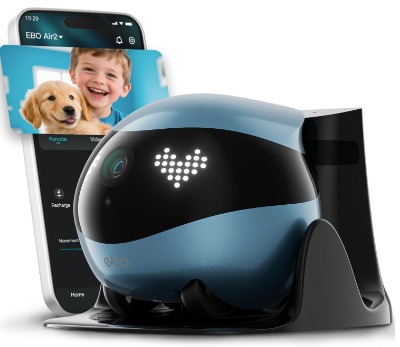
If you want the best that’s available, the Enabot EBO Air 2 is where the technology shines. This is the premium robot that has all the features and the most advanced capabilities.
What It Is
The EBO Air 2 is the top of the line. It features 2K resolution, custom facial expressions, and smart home integration. It’s the most advanced pet camera robot in this roundup.
Best Use Cases
The Air 2 is perfect for:
- Pet owners who want cutting-edge features
- Those with larger homes who want high-quality video everywhere
- People who like interactive features and want to entertain their pets
- Anyone who values premium build quality and performance
- Owners willing to invest in the best option
Key Features Explained Simply
2K Video: Excellent sharp, detailed video. You see everything clearly.
Custom Facial Expressions: The robot has a screen or design element that can display different expressions. This adds personality and makes interaction more engaging. Your pet sees the robot’s “face” change, which they find interesting.
Auto-Recharge: The robot returns to its dock automatically, just like the SE. You never have to worry about manually charging.
Battery-Operated Design: Runs on battery power, so placement is flexible.
2-Way Talk: Clear audio in both directions.
Night Vision: Advanced infrared that performs exceptionally well in low light.
Smart Features: Integration with smart home systems, advanced motion detection, and other connected features.
Real-Life Usage Insight
The EBO Air 2 feels like using a premium product. The build quality is excellent. The materials feel nice. The performance is consistently smooth and responsive.
The custom facial expressions are surprisingly engaging. Your pet actually reacts to the robot’s expressions. Dogs get curious. Cats become more interested. It’s an interactive element that pure cameras don’t have.
The 2K video is noticeably superior to 1080P. In larger rooms, you see the full space in detail. Faraway details remain crisp.
The auto-recharge dock is perfect. You set it up once in a corner, and the robot takes care of itself. Coming home and seeing the robot peacefully docked is weirdly satisfying.
Honest Pros and Cons
Pros:
- 2K video is excellent
- Custom facial expressions add real engagement
- Auto-recharge is convenient
- Premium build quality
- Advanced smart features
- Exceptional battery performance
- Impressive night vision
- Feels like the complete package
Cons:
- Premium pricing (it’s expensive)
- Might be overkill for small spaces
- Custom facial expressions, while cool, don’t matter for basic monitoring
- Requires a good WiFi connection for full feature access
- More complex than simple models
Performance Discussion
The EBO Air 2 performs like a premium device. Everything works smoothly. The 2K video maintains quality across different lighting conditions. The WiFi connection is rock-solid.
Battery performance is outstanding. Most users report eight to ten hours of active use, with some getting even more. The auto-dock works flawlessly.
The robot moves around your home with impressive smoothness. The motors are quiet. The navigation is intelligent.
Ease of Use
Setup is straightforward despite the device being more complex. The app is well-designed and responsive. Advanced features are available if you want them but don’t clutter the main experience.
Even non-technical people feel comfortable using it. Everything just works.
Value for Money
The EBO Air 2 is expensive. There’s no way around it. But if you’re willing to invest, you get the best available technology in this category. The build quality, features, and performance justify the cost if budget isn’t a constraint.
Think of it like comparing a regular car to a luxury car. The budget car gets you where you need to go. The luxury car gets you there in style with extra features. The Air 2 is the luxury option.
Pet Camera Robot Comparison: Side-by-Side
Let me break down how these stack up directly:
| Feature | EBO SE | ROLA Mini | 1080P Generic | 1080P WiFi | EBO Air 2 |
|---|---|---|---|---|---|
| Video Quality | 1080P | 2K | 1080P | 1080P | 2K |
| Auto-Charge | Yes | No | No | No | Yes |
| Night Vision | Good | Good | Good | Good | Excellent |
| 2-Way Talk | Yes | Yes | Yes | Yes | Yes |
| App Control | Yes | Yes | Yes | Yes | Yes |
| Motion Detection | Basic | Advanced | Basic | Basic | Advanced |
| Storage | Local | Manual | SD Card | SD Card (Incl.) | Cloud + Local |
| Price Range | $$ | $$$ | $ | $$ | $$$$ |
| Best For | Simplicity | Compact + Quality | Budget | Ease | Premium |
Smart Buying Guide: How to Choose Your Pet Camera Robot
Picking the right robot comes down to your specific situation. Let me walk through the decision process.
Size and Space
First, think about your home. Are you in a small apartment or a large house? Small spaces work fine with any model. Larger homes benefit from higher resolution video so you can see details across greater distances.
If you have tight hallways or small doorways, the ROLA Mini’s compact size is an advantage.
Budget Constraints
Be honest about what you can spend. The generic 1080P is the most affordable. The EBO SE offers great value. The ROLA Mini and 1080P WiFi are mid-range. The Air 2 is premium.
All of these work well. You’re not making a bad choice at any price point—you’re just choosing what features matter to you.
Resolution Priorities
1080P is standard and adequate. If seeing fine details matters to you, jump to 2K. The difference is noticeable, especially if you have multiple pets in a larger room.
Auto-Charging Importance
Do you want the robot to manage itself? The SE and Air 2 auto-charge, which is convenient. Manual charging for other models is a minor hassle, but not a dealbreaker.
Feature Preferences
Some people love the custom facial expressions and smart home integration. Others think that’s excessive. Some prioritize motion detection and video recording. Others just want to occasionally check in.
Think about what features you’d actually use. Don’t pay for stuff you’ll ignore.
Tech-Savviness
If tech intimidates you, stick with simpler models like the SE. If you like playing with features and integration, the Air 2 rewards exploration.
Who Should Buy Each Robot
Let me make specific recommendations for different people.
The Budget-Conscious Pet Parent: The generic 1080P or the 1080P WiFi model. You get a working robot without overspending. The included SD card in the WiFi version is a nice bonus.
The Practical Minimalist: The EBO SE. It does one thing excellently. Simple setup, reliable performance, good value. No unnecessary complexity.
The Small-Space Dweller: The ROLA Mini. It’s compact, has excellent 2K resolution, and moves smoothly through tight spaces. The motion detection is a nice feature without feeling like overkill.
The Pet Parent Who Wants Interaction: The EBO Air 2. The custom facial expressions and advanced features create a more engaging experience. Perfect if you want your robot to be more than just a camera.
The Tech Enthusiast: The EBO Air 2. Smart home integration, advanced features, and premium performance will keep you happy. You’ll get the most value from all the capabilities.
The Family Protecting Multiple Interests: The 1080P WiFi or SE. You can use these for baby monitoring, elderly care, or home security in addition to pet watching. They’re versatile and get the job done well.
Common Mistakes Pet Owners Make
Learning from others’ experiences helps you avoid frustration.
Buying Without Measuring the Space: Some people get a compact robot for a large home. The resolution doesn’t show enough detail across the distance. Measure your key rooms and check resolution specifications before buying.
Ignoring Floor Type: Robots move differently on hardwood versus carpet. Many people forget to test on their actual flooring before committing. When possible, check product reviews from people with similar floors.
Forgetting About WiFi Strength: All these robots need WiFi. If your WiFi is weak in certain rooms, the robot will struggle. Consider a WiFi extender if you’re having connection issues.
Underestimating Battery Life Needs: If you work long hours, think about whether the robot’s battery lasts your full day. Auto-charging is convenient. Manual charging between uses is doable. Know which you’re getting.
Buying Without a Charger Plan: Where will you place the charging dock? It needs a convenient spot near a power outlet. Don’t buy a robot only to realize you have nowhere to charge it.
Skipping Local Storage in Privacy-Sensitive Homes: If privacy matters to you, local storage is important. Cloud-based storage can be hacked. Local storage (SD cards or local servers) keeps your pet footage private.
Not Reading the App Reviews: Before buying, check the mobile app reviews specifically. A great robot with a terrible app is frustrating. Conversely, an okay robot with a smooth app feels better to use every day.
Expecting Perfect Obstacle Avoidance: None of these robots are highly sophisticated in obstacle detection. They might bump into things. Clear the floor of small toys, cords, and obstacles. Don’t expect it to navigate around a minefield.
Using Your Pet Camera Robot Effectively
Buying the robot is just the start. Here’s how to get the most from it.
Placement Strategy: Put the robot where your pet spends time. In the living room, by the window, near the food area. Don’t just stick it in a corner and forget it.
Create a Charging Routine: If you have manual charging, charge it overnight or during times you’re not using it. Make it a habit so the battery never dies at an inconvenient moment.
Use the App Actively: Check in regularly. The robot is most effective when you’re actually using it. A few quick check-ins per day keeps you connected.
Talk to Your Pet: Use the two-way talk feature. Your voice comforts them. Even five seconds of talking makes them feel heard.
Record the Funny Moments: Most robots record automatically or let you start recording. Capture the silly moments. You’ll love having these memories.
Combine with Other Care: The robot is a supplement to proper care, not a replacement. Your pet still needs regular walks, attention, and love. The robot helps bridge the gap when you can’t be there physically.
Check for Technical Issues: If performance seems off, restart the robot and your WiFi router. Most issues resolve quickly. Don’t assume there’s a major problem without troubleshooting first.
Final Verdict: Which Pet Camera Robot Wins
There’s no single “best” robot because different people have different needs. But if I had to pick based on overall performance, features, and value:
Best Overall: The Enabot EBO SE FamilyBot. It hits the sweet spot of simplicity, reliability, and price. The auto-charging, local storage, and solid 1080P video make it the smart choice for most pet owners. You get genuine peace of mind without paying for features you won’t use.
Best 2K Option: The Enabot EBO ROLA Mini or EBO Air 2. If higher resolution matters and you have the budget, either of these delivers excellent results. The ROLA Mini offers 2K at a moderate price. The Air 2 gives you everything.
Best Budget Pick: The generic 1080P or 1080P WiFi option. You’ll save money without sacrificing core functionality. The WiFi model is especially good because it includes the SD card.
Best Premium Choice: The Enabot EBO Air 2. It’s the most advanced, with the best build quality and most features. If cost isn’t a concern and you want the absolute best, this is it.
Conclusion: Your Pet Deserves a Watchful Eye
Pet camera robots have evolved significantly. They’re no longer novel gadgets—they’re practical tools that help you be a better pet parent.
The robot you choose should fit your home, your budget, and your lifestyle. All the options in this guide are legitimate, quality products. They all deliver on their promises. None of them will disappoint you.
Start by thinking about what matters most. Is it price? Resolution? Convenience? Smart features? Once you know, the right choice becomes obvious.
Your pet will benefit from your watchful eye. You’ll have peace of mind knowing you can check in anytime. And honestly, watching your furry friend through the camera’s eyes is just fun.
Don’t overthink it. Pick the robot that fits your situation, set it up, and start enjoying the connection it brings. Your pet is waiting to meet their little rolling friend.
Quick Comparison Specs Table
| Model | Resolution | Battery Life | Auto-Charge | Price Point | Storage | Best For |
|---|---|---|---|---|---|---|
| Enabot EBO SE | 1080P | 6-8 hrs | Yes | Moderate | Local | Simplicity seekers |
| Enabot ROLA Mini | 2K | 5-7 hrs | No | Mid-High | Local | Compact spaces |
| Generic 1080P | 1080P | 5-7 hrs | No | Low | SD Card | Budget buyers |
| 1080P WiFi | 1080P | 6-8 hrs | No | Moderate | SD Card (Incl.) | Easy setup |
| Enabot EBO Air 2 | 2K | 8-10 hrs | Yes | High | Local + Cloud | Premium seekers |
Resources and Where to Find Them
You can find these robots through major online retailers. Read the reviews on the retailer’s site to see what actual buyers are saying. Check for warranty details and return policies before purchasing.
Join online pet owner communities and forums. People there share real experiences with these robots. You’ll get honest feedback that helps you decide.
Final Tips Before You Buy
- Read recent customer reviews, not just the promotional material
- Check the warranty coverage and customer service reputation
- Make sure the robot is compatible with your home WiFi
- Consider your return policy if you’re unhappy
- Buy from reputable sellers with buyer protection
Your pet camera robot journey is about to begin. Choose wisely, set it up properly, and enjoy the peace of mind it brings. Your pet—and your own heart—will thank you.

Hi, I’m Mary, the founder of PetGadgetPro.com. I’m a passionate pet lover with a special place in my heart for dogs and cats. I share practical advice and honest insights on pet gear to help pet parents make better choices. My dedicated research team studies products in depth, and our writers create reviews using trusted, authentic sources—so you can feel confident choosing the best for your pets.