5 Best Cat Camera Collar In 2026
Have you ever wondered what your cat does when you’re not watching? Those mysterious adventures through the neighborhood, the secret hideouts, or the curious encounters with other animals remain hidden from view. A cat camera collar solves this puzzle by giving you a front-row seat to your feline’s daily escapades.
These tiny wearable cameras attach to your pet’s collar and record everything from their perspective. The footage reveals fascinating insights into their behavior, helps track their whereabouts, and creates entertaining videos you’ll watch repeatedly. After testing multiple options and researching countless products, we’ve assembled this comprehensive guide to help you find the perfect camera collar for your furry friend.
Why Your Cat Needs a Camera Collar
Cats are natural explorers with independent spirits. Unlike dogs that stay close to their owners, felines venture into territories we never see. A camera collar transforms your cat into a wildlife documentarian, capturing moments that would otherwise remain mysteries.
These devices serve practical purposes beyond entertainment. They help locate lost pets by showing their last known routes. They monitor health issues by recording unusual behaviors or mobility problems. They even provide evidence if your cat gets into conflicts with other animals or faces dangers in the neighborhood.
The videos also strengthen your bond with your pet. Seeing the world through their eyes helps you understand their preferences, fears, and daily routines. This knowledge allows you to create a more enriching environment tailored to their specific needs.
Key Features to Consider
Video Quality
High-definition 1080P resolution has become the standard for pet cameras. This clarity ensures you can identify details like other animals, plants they investigate, or obstacles they encounter. Lower resolutions create grainy footage that defeats the purpose of monitoring your cat’s activities.
Frame rate matters just as much as resolution. Smooth video capture prevents choppy footage during quick movements or sudden turns. Look for cameras that maintain consistent quality during action sequences.
Weight and Size
Cats are sensitive to anything attached to their bodies. A bulky camera creates discomfort and alters their natural movements. The ideal device weighs less than an ounce and measures small enough to avoid catching on branches or tight spaces.
The camera should sit comfortably on the collar without sliding around or flipping during activity. Poor positioning results in footage of the ground or sky instead of your cat’s actual view.
Battery Life
Recording time determines how much of your cat’s day gets documented. Some cameras last 60-90 minutes per charge, while others extend to several hours. Consider your cat’s outdoor habits when evaluating battery capacity.
Quick charging features reduce downtime between recording sessions. Wireless charging adds convenience by eliminating fumbling with tiny ports that can break or collect dirt.
Storage Capacity
Video files consume significant space. Micro SD card compatibility lets you expand storage based on your needs. Some cameras include built-in memory, but removable cards offer flexibility to swap out full cards and continue recording.
Card capacity ranges from 8GB to 128GB or more. Higher capacity means less frequent file transfers and longer uninterrupted recording periods.
Connectivity Options
Some cameras work independently without apps or WiFi connections. These simple devices record directly to memory cards, which you then view on computers or other devices. This approach suits owners who prefer straightforward operation without technology complications.
App-enabled cameras provide real-time viewing and remote control features. You can check on your cat’s location or download footage wirelessly. However, these options typically cost more and require compatible smartphones.
Top 5 Cat Camera Collars Reviewed
1. ehomful HD 1080P Cat Camera Collar
Product Description
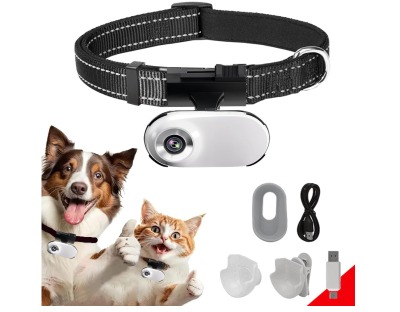
The ehomful HD 1080P delivers solid performance in a compact package designed specifically for cats. This wireless mini sport camera records clear video without requiring WiFi connectivity or mobile apps. The device focuses on simplicity—you attach it to your cat’s collar, press record, and let your pet explore.
Built with durability in mind, this camera withstands the rough-and-tumble lifestyle of active cats. The housing protects internal components from bumps, scratches, and light rain. The attachment mechanism keeps the camera secure during climbing, jumping, and running.
The one-button operation makes this camera accessible to anyone regardless of technical skill. No complex menus or settings to navigate. Just straightforward recording that starts with a single press.
Pros
- Clear 1080P video quality captures detailed footage
- No WiFi or app requirements simplify operation
- Lightweight construction won’t burden small cats
- Durable build withstands outdoor adventures
- Affordable price point for budget-conscious buyers
- Simple one-button control eliminates confusion
- Works both indoors and outdoors
Cons
- Battery life limits extended recording sessions
- No real-time viewing capability
- Lacks advanced features like motion detection
- Manual file transfer required via computer
- No built-in screen for immediate playback
Best For
This camera suits cat owners who want basic recording functionality without complications. If you prefer reviewing footage later rather than monitoring live, this option provides excellent value. It’s also ideal for those who dislike relying on apps or WiFi connections.
2. Cat Camera Collar with Phone APP (XS-Collar)
Product Description
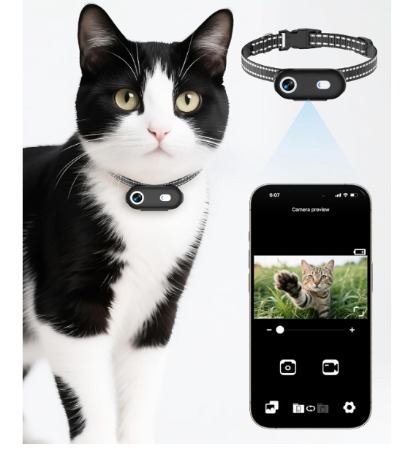
This app-enabled camera collar brings modern connectivity to pet monitoring. The 1080P HD recording combines with smartphone integration to create a comprehensive tracking solution. Available in XS and M sizes, it accommodates both cats and small-to-medium dogs.
The dedicated phone application unlocks features beyond basic recording. View live footage from anywhere, download videos wirelessly, and adjust camera settings remotely. The app interface displays battery status, storage capacity, and recording duration at a glance.
The collar itself uses adjustable sizing to fit various neck measurements. The camera module attaches securely to prevent loss during vigorous activity. Despite the advanced features, the device maintains a compact form factor that doesn’t restrict movement.
Pros
- Real-time viewing through smartphone app
- Wireless video download saves time
- Adjustable sizing fits multiple pets
- Remote control of camera functions
- Clear notification system for battery and storage
- Sleek design looks modern and professional
- Works with both iOS and Android devices
Cons
- Requires stable phone connectivity
- App learning curve for less tech-savvy users
- Higher price than non-connected alternatives
- Battery drains faster with app features active
- May experience connection issues in remote areas
Best For
Tech-comfortable pet owners who want remote monitoring capabilities will appreciate this camera. If you travel frequently or work long hours, the app features provide peace of mind. It’s perfect for those who want instant access to their pet’s activities.
3. Cat Camera Collar 1080P HD (No WiFi, No APP)
Product Description
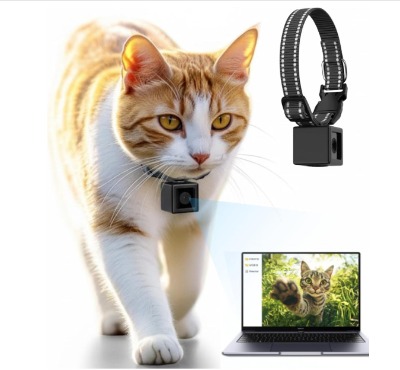
This stripped-down camera collar eliminates all wireless features in favor of pure recording performance. The 1080P HD video quality matches premium competitors while keeping the price accessible. The device targets owners who want pet POV footage without technological complexity.
The minimalist design reduces weight to negligible levels. Your cat barely notices the camera’s presence, allowing natural behavior to shine through in recordings. The attachment system works with standard collar widths and maintains position during all activities.
Since this camera stores everything locally, you never worry about connection drops, app crashes, or WiFi dead zones. The footage stays secure on your micro SD card until you’re ready to transfer it. This independence from external services also protects your privacy.
Pros
- Ultra-lightweight won’t disturb cats
- No subscription fees or app requirements
- Excellent video quality for the price
- Simple operation anyone can master
- Privacy-focused local storage only
- Compatible with standard collars
- Reliable performance without connectivity issues
Cons
- Micro SD card sold separately
- No remote viewing or live monitoring
- Basic feature set lacks extras
- Manual charging via USB cable
- Limited battery runtime per charge
Best For
This camera works well for owners seeking pure recording without bells and whistles. If you’re comfortable transferring files manually and don’t need instant access to footage, this budget-friendly option delivers quality results. It’s excellent for documenting your cat’s activities without ongoing costs.
4. ehomful HD 1080P Cat Camera Collar (Outdoor/Indoor Gift)
Product Description
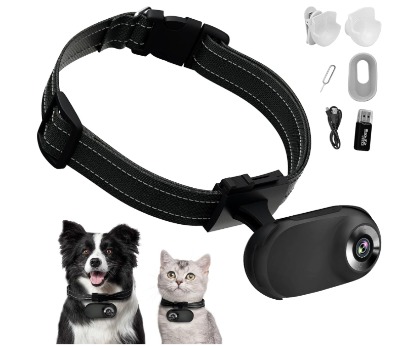
Positioned as both a functional tool and thoughtful gift, this ehomful model balances performance with presentation. The camera comes packaged attractively, making it suitable for birthdays or special occasions. Beyond the gift-worthy packaging, the device performs admirably in real-world conditions.
The wireless design supports both outdoor adventures and indoor monitoring. Whether your cat roams the neighborhood or explores your home, the camera captures it all. The mini sport cam form factor keeps weight minimal while maintaining robust recording capabilities.
Like other ehomful products, this version skips WiFi connectivity in favor of standalone operation. This decision reduces complexity and extends battery life compared to always-connected alternatives. The trade-off suits many cat owners perfectly.
Pros
- Gift-ready presentation and packaging
- Versatile indoor and outdoor use
- Compact size comfortable for cats
- No ongoing connectivity costs
- Decent battery life for typical sessions
- Easy-to-use interface
- Durable construction for active pets
Cons
- Similar limitations to other ehomful models
- No live viewing features
- Requires manual video transfer
- Basic recording modes only
- Micro SD card needed for storage
Best For
If you’re shopping for a cat lover in your life or want something presentable, this camera makes an excellent choice. The gift packaging adds value without increasing the price significantly. It’s also suitable for first-time camera collar users who want straightforward functionality.
5. Thumb Body Cam 1080P HD with Wireless Charging
Product Description
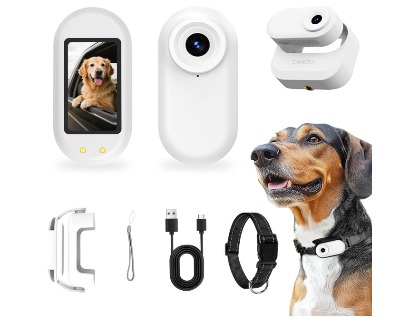
The Thumb Body Cam represents the premium end of cat camera collars. This device includes features typically reserved for high-end action cameras. The 1080P HD recording meets expectations, but the additional capabilities set this model apart from competitors.
Motion detection technology activates recording only when your cat moves. This smart feature conserves battery life and storage space by eliminating hours of stationary footage. The 1.47-inch screen allows immediate playback without connecting to other devices.
The wireless charging dock revolutionizes the charging experience. Simply place the camera on the magnetic mount, and it powers up automatically. No cables to plug in, no ports to align perfectly in dim light. The convenience factor alone justifies the price premium for many users.
The magnetic mount also serves as a storage spot for the camera when not in use. The compact dock sits discreetly on a shelf or desk, keeping everything organized and ready for the next recording session.
Pros
- Wireless charging eliminates cable hassles
- Motion detection saves battery and storage
- Built-in screen for instant playback
- Magnetic mount simplifies charging and storage
- Premium build quality throughout
- Advanced features justify higher price
- Excellent video quality in various lighting
Cons
- Most expensive option in this roundup
- Screen adds slight bulk to the device
- Learning curve for motion detection settings
- Requires the specific charging dock
- Heavier than simpler alternatives
Best For
This camera suits owners willing to invest in premium features. If convenience matters more than budget and you appreciate thoughtful design, the Thumb Body Cam delivers. It’s perfect for those who regularly use the camera and want the best possible experience.
Comparing the Top Contenders
When placing these cameras side by side, clear patterns emerge. The ehomful models offer reliable basic functionality at affordable prices. They work well for casual users or those testing pet cameras for the first time. The simple operation and lack of ongoing costs make them accessible to everyone.
The app-enabled option caters to users who want modern connectivity. Real-time viewing and remote control justify the price increase for tech-savvy owners. However, the reliance on smartphone connectivity may frustrate those with older devices or poor cell service.
The standalone HD camera without WiFi appeals to privacy-conscious users and those avoiding subscription services. It captures excellent footage without any external dependencies. The trade-off comes in convenience—you must physically retrieve the camera to access videos.
The Thumb Body Cam stands alone in the premium category. Its advanced features command a higher price but deliver corresponding value. The wireless charging and motion detection represent genuine improvements over basic models. For regular users, these conveniences quickly become indispensable.
Installation and Setup Guide
Preparing Your Cat
Introduce the camera gradually to avoid stressing your pet. Let them sniff and investigate the device while it’s off. Place it near their favorite resting spots so they become familiar with its presence.
Start with short wearing sessions indoors. Attach the camera without turning it on initially. Give treats and praise to create positive associations. Gradually increase the duration as your cat accepts the new accessory.
Proper Attachment Methods
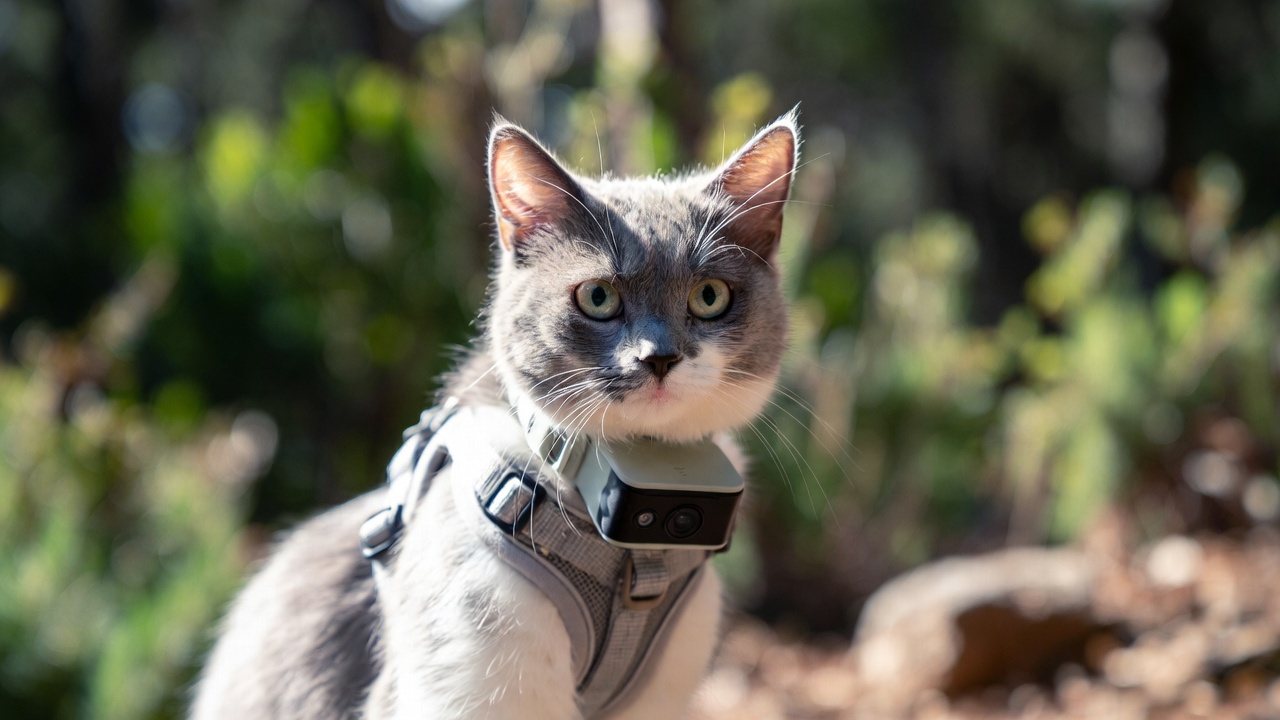
Position the camera on the collar so it faces forward from your cat’s chest area. This angle captures their natural field of view. Secure all straps and connections to prevent loosening during activity.
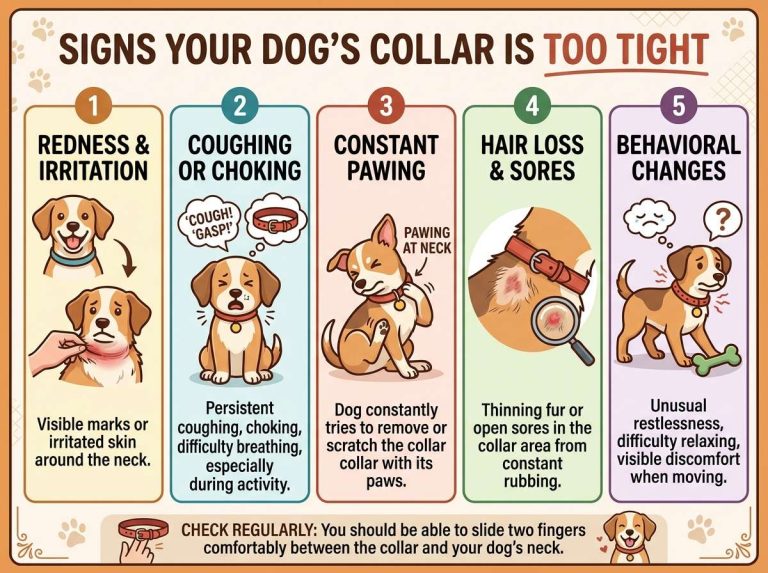
Test the security by gently tugging on the camera. It should remain firmly attached without causing the collar to tighten uncomfortably. Ensure you can still fit two fingers between the collar and your cat’s neck for safety.
First Recording Session
Keep the initial recording brief—just 10-15 minutes. This short session helps identify any problems before committing to longer recordings. Watch the footage to verify proper camera angle and positioning.
Check for issues like excessive sky or ground in the frame. Adjust the camera position if needed. Listen for audio quality to ensure the microphone isn’t blocked or muffled.
Ongoing Maintenance
Clean the camera lens regularly with a soft, dry cloth. Dirt, dust, and pet hair accumulate quickly on the lens surface. Even small smudges reduce video clarity significantly.
Inspect the attachment mechanism after each use. Look for wear, loose connections, or damage. Replace worn components immediately to prevent losing the camera during recording sessions.
Maximizing Your Camera Collar
Best Recording Times
Early morning and evening provide the most interesting footage for outdoor cats. These periods coincide with peak wildlife activity. Your cat’s natural hunting instincts activate during these hours, creating compelling video content.
Avoid recording during midday heat when cats typically rest. The footage mostly shows sleeping or minimal movement. Save your battery life for active periods that actually reveal your cat’s adventures.
Editing and Sharing Videos
Transfer footage to your computer for editing. Simple video editing software lets you trim boring sections and compile highlights. Create short clips that showcase the best moments rather than sharing hours of raw footage.
Social media platforms love pet POV videos. Short, engaging clips perform well on Instagram, TikTok, and Facebook. Add captions describing what your cat encountered for viewers who might not understand feline behavior.
Storage Organization
Develop a filing system for your pet videos. Create folders organized by date or activity type. Label files descriptively so you can find specific footage later. Memorable moments deserve better organization than random numbered files.
Back up important videos to cloud storage or external drives. Camera memory cards can fail unexpectedly. Losing months of footage to technical failure feels devastating, especially if you captured rare or special moments.
Safety Considerations
Collar Fit and Breakaway Features
Never use a camera collar that doesn’t include breakaway safety features. Cats need the ability to escape if their collar catches on branches, fences, or other obstacles. The collar should release under pressure to prevent choking or injury.
Check the fit regularly as cats grow or lose weight. A too-loose collar slides around and creates poor footage. A too-tight collar causes discomfort and potential health issues.
Environmental Hazards
Avoid camera use in extremely wet conditions unless the device specifically states waterproof capabilities. Water damage ruins electronics and voids warranties. Light rain typically doesn’t cause problems, but heavy downpours or swimming pose risks.
Be cautious in areas with dense vegetation where the camera might catch on thorns or branches. The added bulk on the collar can snag more easily than a bare collar. Monitor your cat’s usual routes for potential hazards.
Weight Limitations
Small kittens and petite cats may struggle with even lightweight cameras. Wait until your cat reaches appropriate size and strength before adding equipment to their collar. Veterinarians can provide guidance on suitable ages and weights.
Watch for signs of discomfort like excessive grooming of the neck area, reluctance to move normally, or attempts to remove the collar. These behaviors indicate the camera might be too heavy or poorly positioned.
Troubleshooting Common Issues
Footage Pointing Wrong Direction
The camera angle depends entirely on collar position and your cat’s build. Experiment with placement along the collar’s length. Small adjustments of just an inch can dramatically change the viewing angle.
Some cats have fluffier chests that tilt the camera upward. Others have sleeker builds that aim it downward. Find the sweet spot through trial and error during short test recordings.
Battery Draining Quickly
Cold weather significantly reduces battery performance. Bring the camera to room temperature before charging and using. Store it indoors when not recording to maintain optimal battery health.
Close any apps running in the background for app-enabled cameras. Background processes drain power even when not actively viewing. Disable features you don’t need to extend recording time.
Poor Video Quality
Clean the lens thoroughly before each use. Fingerprints, dust, and pet hair create blurry spots or haziness. Use appropriate lens cleaning materials rather than rough cloths that might scratch the surface.
Check your lighting conditions. Cameras perform best in good natural light. Dim indoor environments or nighttime recording may produce grainy footage depending on the camera’s specifications.
Connection Problems (App Models)
Ensure your smartphone’s operating system meets the app’s requirements. Outdated phones may lack compatibility with newer apps. Update your phone’s software before troubleshooting further.
Reset the camera’s WiFi connection by following the manufacturer’s instructions. Sometimes the pairing process needs repeating to establish a stable connection. Stay within the specified range during setup and use.
Understanding Video Resolution and Quality
The 1080P HD standard mentioned in all these cameras refers to 1920×1080 pixel resolution. This format provides clear, detailed footage suitable for viewing on modern screens. Lower resolutions like 720P appear noticeably less sharp, especially on large displays.
Frame rate works alongside resolution to determine video quality. Most pet cameras record at 30 frames per second, which creates smooth motion for typical cat activities. Higher frame rates like 60fps help with fast action but consume more storage space and battery power.
Bitrate affects how much detail the camera preserves during compression. Higher bitrates maintain better quality but create larger file sizes. Pet cameras typically optimize this balance for reasonable file sizes without excessive quality loss.
Privacy and Legal Aspects
Recording in public spaces generally faces fewer restrictions than recording inside private property. Your cat’s outdoor adventures typically don’t raise privacy concerns. However, footage showing neighbors’ yards or windows could create uncomfortable situations.
Be thoughtful about what you share online. Blur or edit out identifiable information about neighbors, their homes, or their pets. Respect others’ privacy even when your cat technically captured the footage legally.
Some jurisdictions have specific laws about recording audio along with video. While unlikely to apply to pet cameras, being aware of local regulations prevents potential issues. Check your area’s laws if you have concerns.
Cost Analysis and Value Assessment
Entry-level cat camera collars start around $30-$40. These basic models provide essential recording features without extras. They represent minimal investment for trying pet cameras without major financial commitment.
Mid-range options with app connectivity typically cost $60-$90. The added features justify the price increase for users who value remote access and wireless convenience. Consider whether you’ll actually use these features before paying extra.
Premium models with advanced features can exceed $100. The Thumb Body Cam falls into this category with its wireless charging and motion detection. These investments make sense for frequent users who want the best experience.
Don’t forget ongoing costs like micro SD cards if not included. High-capacity cards add $10-$30 depending on size. Budget for replacement parts like collar attachments or charging cables that may wear out.
Real-World Performance Expectations
Cat camera collars excel at showing your pet’s perspective but have limitations. The footage bounces and shakes during movement—cats don’t walk with steady cam operators in mind. Expect motion blur during running or jumping.
Audio quality varies significantly between models. Most cameras pick up wind noise, rustling sounds, and your cat’s vocalizations. Don’t expect crystal-clear audio suitable for identifying distant conversations or subtle sounds.
Battery life claims assume ideal conditions. Real-world usage often falls short of manufacturer specifications. Temperature extremes, frequent WiFi connections, and high-quality recording settings all drain batteries faster than advertised.
Storage fills up quickly when recording at 1080P. An hour of footage can consume several gigabytes. Plan accordingly with appropriate SD card capacity and regular file transfers.
Making the Final Decision
Your cat’s personality should influence your choice. Adventurous outdoor cats benefit most from these cameras, capturing exciting exploration footage. Indoor cats produce less varied content but still reveal interesting behaviors.
Consider your technical comfort level honestly. App-enabled cameras offer more features but require smartphone proficiency. Simple record-and-review models suit those who prefer straightforward operation.
Think about your primary goals. Entertainment purposes need different features than safety monitoring. Define what you want to achieve before selecting based on features.
Budget matters but shouldn’t be the only factor. The cheapest option that breaks quickly costs more than a reliable mid-priced camera. Balance initial cost against expected longevity and satisfaction.
Conclusion
Cat camera collars open a window into your pet’s secret life. These compact devices capture perspectives you’d never see otherwise, from backyard wildlife encounters to mysterious indoor adventures. The footage entertains, educates, and sometimes surprises with revelations about your cat’s daily activities.
The five cameras reviewed here represent different approaches to pet recording. The ehomful models offer reliable basic functionality at accessible prices. The app-enabled option brings modern connectivity for tech-savvy users. The standalone HD camera prioritizes simplicity and privacy. The Thumb Body Cam delivers premium features for those wanting the ultimate experience.
No single camera works perfectly for everyone. Your cat’s size, activity level, and environment all factor into the decision. Your personal preferences regarding technology, budget, and features narrow the options further. Take time to evaluate your specific needs against each camera’s strengths and weaknesses.
Start with clear expectations about what cat camera collars can and cannot do. They provide fascinating glimpses into feline behavior but won’t produce professional documentary footage. They help monitor your pet’s activities but don’t replace proper supervision and care. They create entertaining videos but require patience during setup and adjustment.
The right cat camera collar enhances your relationship with your pet. It reveals their personality, preferences, and daily experiences in ways that deepen your understanding. It creates memories worth preserving and shares your cat’s unique view of the world. It transforms curiosity about their activities into documented adventures you can revisit repeatedly.
Invest in a quality camera that matches your needs, introduce it properly to your cat, and prepare for hours of fascinating footage. Your feline friend has stories to tell—these cameras finally give them the voice to share their adventures from their own perspective.

Hi, I’m Mary, the founder of PetGadgetPro.com. I’m a passionate pet lover with a special place in my heart for dogs and cats. I share practical advice and honest insights on pet gear to help pet parents make better choices. My dedicated research team studies products in depth, and our writers create reviews using trusted, authentic sources—so you can feel confident choosing the best for your pets.